3D product animation for industrial equipment: films, interactive 3D, AR and a website that sells

3D product animation for industrial equipment is a film or an interactive model, built from the unit’s drawings, that shows what a camera cannot: the inside, how it works and how it comes apart. Build the model once and the same files give you the films, a 3D viewer on the product page, an AR model a buyer stands in their own yard, and stills for datasheets and tenders.
Buyers look for this. In Google Keyword Planner, “3d animation services”, “3d rendering services” and “website for manufacturers” each get 1,000 to 10,000 searches a month across the US, the UK, the UAE and Saudi Arabia (my pull, 18 October 2026). Top-of-page bids for “industrial marketing agency” and “manufacturing marketing agency” run $54 and $66 a click.
I built the whole set for an industrial process-equipment distributor serving plants across the Gulf: Blender films, seven interactive equipment families, a TEMA type explorer, an AR model, and 40 product pages in English and Arabic. Here is what each piece is, what it costs on the market, and how to keep it fast on a phone.
What is 3D product animation for industrial equipment?
It is engineering-accurate 3D, lit and filmed like a product shoot, then cut three ways: films, stills and real-time models.
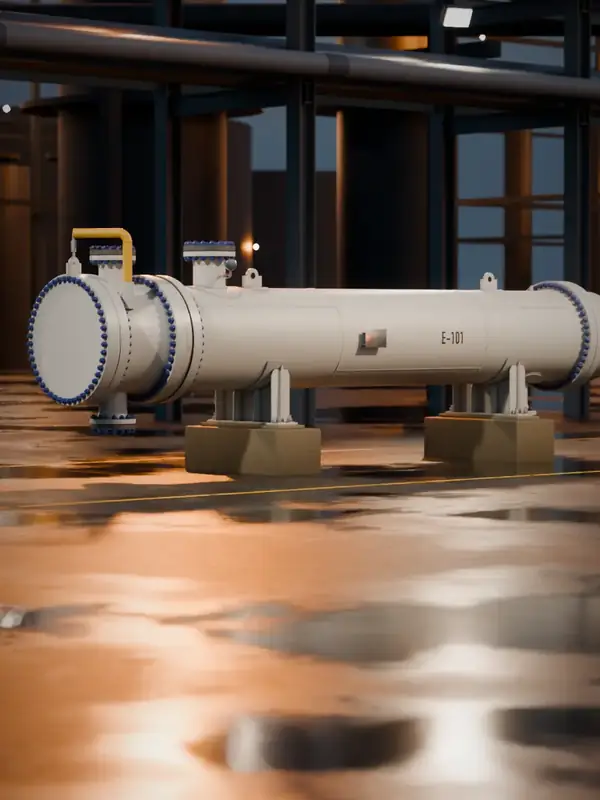
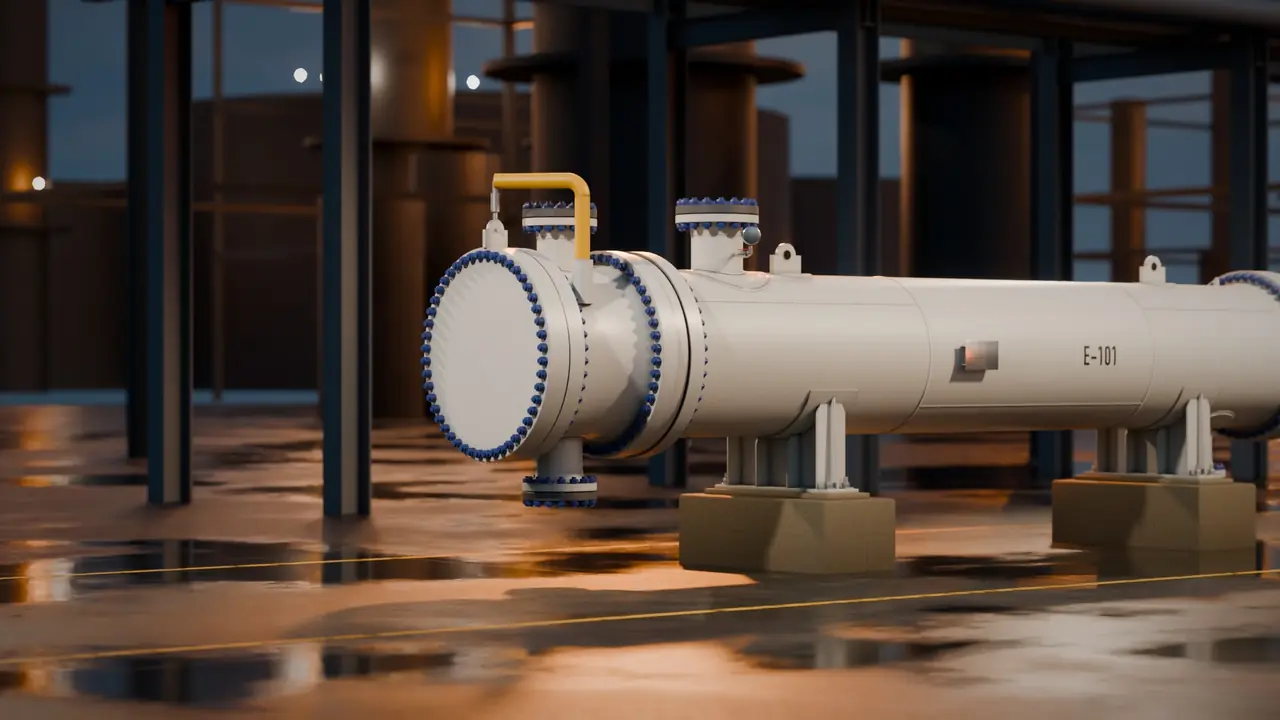
The centrepiece for the client is E-101, a TEMA AES shell-and-tube exchanger I modelled in Blender: 1,148 copper-nickel tubes, class 300 flanges, a cover davit, saddles on concrete piers and a stencilled tag. Its 240-frame film walks up to the unit at night, unbolts the channel, swings it clear, draws the tube bundle onto timber cribs and runs an eddy current probe down the tubes. On the client’s site it plays as you scroll, with labels that track the parts.
Drag through the bundle pull.Real frames from the 3D film I made for the client. Drag the picture or the dimension line; the balloons follow the parts.
| STEP | SEQUENCE |
|---|
- FRAMES ARE BLENDER RENDERS, NOT PHOTOGRAPHS.
- TEMA AES: REMOVABLE CHANNEL AND COVER, ONE-PASS SHELL, FLOATING HEAD WITH BACKING DEVICE.
- 1,148 COPPER-NICKEL TUBES. CLASS 300 FLANGES.
- BALLOONS TRACK PIN DATA EXPORTED FROM THE 3D SCENE.
One frame in three of the film, loaded only when this drawing comes into view: about 2.7 MB on a laptop and 1.7 MB on a phone.
What is technical animation: cutaways, exploded views and how it works?
Technical animation (also called mechanical or equipment animation) explains a machine instead of selling a mood. Three moves do most of the work:
- Cutaway. Slice the unit to show what a photo hides. I cut a reformer furnace open to show the tubes glowing inside, and cut a three-phase separator in half so gas, oil and water separate in front of you.
- Exploded view. Take it apart in order. The plate exchanger’s nuts spin off, the pressure plate rolls back and 40 plates unfurl.
- How it works. Show the physics. In the reverse osmosis rack, the membrane layers turn sea green as water reaches them.
Every family on the client’s site has its own control, and no two repeat. Pick one:
Seven equipment families, seven different hands-on controls.Pick a tab. Each loop is the real Blender film; the datasheet says what the visitor does with it on the client’s site and why it helps sell the unit.
Three-phase separator
Cut in half: gas, oil and water each leave by their own outlet.
- ON THE SITE
- Press and hold to feed.
- WHAT HAPPENS
- Holding the button runs the well stream in. A ring fills as you hold; let go and the vessel settles back.
- WHY IT SELLS
- The internals a buyer pays for, the inlet device, weir and vane pack, are hidden in any photo. Here they are the point.
Loops are silent, about 0.1 to 0.6 MB each, and only load and play while this binder is on screen.
3D animation services or 3D rendering services: which do you need?
3D rendering gives you still images: datasheet covers, tender documents, catalogue pages. 3D animation gives you motion: a how-it-works film, a cutaway, a trade show loop. Real-time 3D runs in the browser and the visitor controls it.
You rarely need to choose. The model is the expensive part, so build it to an engineering standard once and render stills, films and web versions from the same file. Every image on this page comes from one set of Blender scenes.
What is a 3D product viewer, and when do you need a product configurator?
A 3D product viewer puts a model on the page that buyers can turn and zoom. A product configurator goes further: each choice changes the product, and the page shows the result and the spec. I wrote up the tools behind both in three.js website.
For the client I built a TEMA type explorer in three.js: pick a front head, shell and rear head and an X-ray bundle model redraws, then the choice fills the enquiry form. Here is a lighter version as a general arrangement drawing. Its quote button carries your spec.
Configure a shell-and-tube exchanger.Pick a front head, a shell and a rear head. The TEMA code builds as you choose, the drawing redraws, and the quote button carries your spec.
TEMA type AES
1000 x 6096 mm, 1148 tubes
Letter meanings follow the TEMA nomenclature as reproduced in R. Mukherjee, Effectively Design Shell-and-Tube Heat Exchangers, Chemical Engineering Progress, February 1998. The current standard is the 2026 Edition of the TEMA Standards. A sketch, not a design: sizing and code checks come with the quote.
For building products, I built a 3D building product configurator where you tap a part of a building and get the products that fit, the spec and the quantities.
What is web AR, and can a buyer see the unit in their own yard?
Web AR opens the phone’s camera from a link and stands a 3D model in the room or the yard, at real size, with no app. On Android it runs through Scene Viewer, on iPhone through AR Quick Look. Google’s free model-viewer puts both behind one button.
E-101 ships as a 1.2 MB glTF file with Draco-compressed meshes. Nothing loads until you ask:
Put E-101 in your yard.The same exchanger as a real-time 3D model. Nothing heavy loads until you tap. Orbit it on a laptop; on a phone, “View in your space” stands it on your floor through the camera, at full size.
 BAY 2 · E-101 · AR READY
FILEe101.glb, glTF binary, Draco meshes, 1.2 MB
ON A LAPTOPDrag to orbit, scroll or pinch to zoom
ON A PHONEAR through Scene Viewer on Android and Quick Look on iPhone
Can you turn BIM or CAD files into an interactive 3D product or plant?
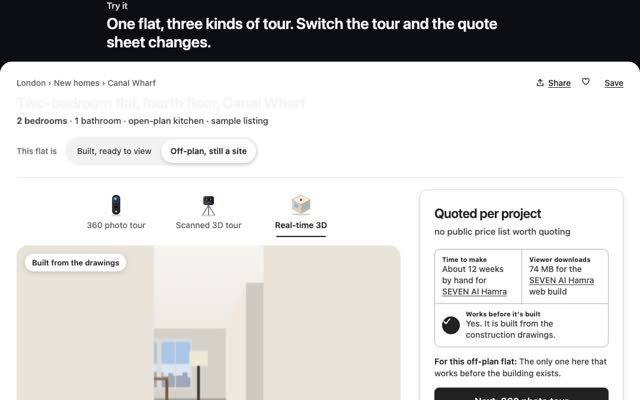
Yes. BIM to 3D is how I won SEVEN Al Hamra in Riyadh: I took the construction team’s Revit, IFC and Navisworks models, about 650 MB, and turned them into a real-time replica people walked through before the building opened. The browser version is a 74 MB download. People search for Revit to web or an IFC viewer online; a viewer shows the file as it is, while I rebuild it for speed.
Equipment works the same way from STEP or IGES CAD, GA drawings and datasheets. Standard equipment needs no CAD: E-101 is built from standard dimensions. If you want the model tied to live plant data, that is a digital twin.
What should a website for manufacturers and distributors do?
Answer the engineer first, then let the 3D sell. The rules I used for the client’s site:
- Text first, 3D beside it. Each product page opens with a two-line answer, specs at a glance and the scope, with the film beside it on a laptop and after the facts on a phone.
- A product finder. Search all 40 products from one box.
- A quote button on every product, which carries the product name into the enquiry.
- Client letters tied to products. Each reference letter shows on the product pages it talks about, not on a testimonial wall.
- One URL per product, line and service, with a sitemap, unique titles and real HTML text that search engines can read.
- Bilingual Arabic and English. Arabic pages live under /ar/ with hreflang pointing each page at its twin. The Arabic is formal Modern Standard Arabic, the register the sector writes in, with industry terms checked one by one.
Where do industrial companies use 3D, and what do you get?
Where it earns its keep: tenders and bid packs, trade shows on a screen or tablet, distributor and sales rep enablement, operator training, maintenance and shutdown planning, and LinkedIn.
What you receive: a master film rendered at the size you need, 4K included; LinkedIn cuts in 9:16 and 4:5; web-embeddable 3D; GLB and USDZ files for AR; interactive product pages; English and Arabic versions.
What I need from you: GA drawings, STEP or IGES CAD, BIM models (Revit, IFC, Navisworks), datasheets and photos of the real unit. For standard equipment, no CAD at all.
Can the same 3D make product demo videos for LinkedIn?
Yes, and they cost little once the model exists. From the client’s renders I cut 16 social clips of 21 seconds, with callouts that ride the parts and one instrument per product, such as a torque trace, an eddy current scope or a pressure dial.
How do you make industrial 3D load fast on a phone?
A scroll film is hundreds of pictures, so the trick is deciding which ones to send:
- AVIF frames. The phone film is 7.6 MB of AVIF at 720 by 1280, against 13.9 MB for the desktop set at 1920 by 1080.
- A skeleton first. The opening sends five landing frames and every eighth frame, then only frames near where you are. On data saver it sends every other frame.
- Load on approach. three.js and the AR viewer load only when their section comes within one and a half screens.
The phone’s first screen fell from 9.5 MB to 2.4 MB. Frames decode ahead of the playhead, and the live test showed zero janky frames on phone and desktop at four times CPU throttle. More on budgets in Unity WebGL on mobile and Gaussian splatting on a website.
What does 3D product animation cost?
Published market figures, not my prices:
- Animation. $5,000 to $50,000+ per finished minute, with about $10,000 as a mid-tier baseline. A 30-second product animation runs $5,000 to $15,000 basic, and $20,000 to $50,000+ for a technical version with exploded views (Framesixty, 10 September 2026). 4K rendering adds 20 to 40% and rush delivery 25 to 50% (Vidico, 18 September 2026).
- Rendering. $50 to $150 per image for basic items, $150 to $500 mid-range, $1,200 to $3,000+ for complex products (Framesixty, 29 July 2026).
- Configurators. Custom builds from $4,000 to $10,000 for one product, $10,000 to $30,000 with pricing logic, $30,000 to $150,000+ with ERP integration (Framesixty, 1 September 2026).
- The website. Web projects on Clutch typically cost under $10,000; the average agency project is $66,499.09 (Clutch, updated 21 September 2026).
The model is the biggest line. Reuse it everywhere and every later piece gets cheaper. I price each project after a first call.
How long does it take?
Framesixty puts mid-tier product animation at 4 to 8 weeks and custom three.js configurators at 2 to 4 months. SEVEN Al Hamra took me just under 12 weeks from first file to sign-off, by hand. With AI in my workflow now, the client’s seven families went from first model to live page in days.
Questions people ask
How much does 3D product animation cost?
Published 2026 guides put it at $5,000 to $50,000+ per finished minute, with 30-second product films from $5,000. A technical film with exploded views sits higher.
Do I need CAD files for 3D animation?
No. CAD, BIM or GA drawings save modelling time and make the model exact, but standard equipment can be built from datasheets and photos.
Can buyers view a 3D model in AR without an app?
Yes. A GLB file with model-viewer opens AR through the phone’s own viewer on Android and iPhone, from a link.
Does 3D on a product page slow the site down?
Only if it loads up front. Put the text first, show a still, and load frames or the model as the visitor reaches them.
Can you build a bilingual Arabic and English website?
Yes. Separate /ar/ pages with hreflang, right-to-left layout and formal Arabic, so each language ranks on its own.
What is the difference between 3D rendering and 3D animation?
Rendering makes still images, animation makes moving film. Both come from the same model.
If you sell equipment and want films, interactive 3D or a site that wins enquiries, see industrial 3D and web or write to me at m@tawfik.tv.