Unity WebGL on mobile: how I took a 650 MB model to a 74 MB build at 60 fps

A Unity WebGL build is big and slow on a phone for five reasons: too many triangles, textures in the wrong format, lights worked out live every frame, too many draw calls, and engine code nobody uses, all downloaded before the first frame. Fix them in that order, then compress the build with Brotli and serve it with the right headers.
That is the route I took with SEVEN Al Hamra: a 650 MB construction model that became a 74 MB browser build drawing about 700,000 triangles at 60 fps on a laptop graphics chip. You can walk through it now.
For scale: the median mobile home page in July 2025 weighed 2.6 MB, according to the HTTP Archive Web Almanac 2025. My finished build is still about 28 times that, so every megabyte you cut is one a visitor on mobile data does not wait for.
Why are Unity WebGL builds so big and slow on phones?
Four things stack up against you in a phone browser.
- One big download. Unity packs every scene and asset into a
.datafile. The browser unpacks it into memory and keeps the uncompressed data there while the content runs (Unity: memory in Unity Web). Phones have the least memory to spare. - A heap that has to grow in one piece. Unity’s heap is one contiguous block. If the browser cannot find a big enough block when it grows, the app crashes, so Unity’s advice is to keep the heap as small as possible.
- Slow draw calls. Sending work to WebGL costs more CPU time than native OpenGL, so Unity recommends avoiding large numbers of draw calls per frame and using batching and instancing (Unity: Web performance).
- The wrong texture format. If a phone does not support the format you built with, Unity decompresses the textures in software at runtime. It still works, with more memory and a slower frame (Unity: texture compression in Web).
Construction models make all four worse. They hold everything the builders need, including what sits inside ceilings, walls and floors, at a level of detail no browser needs.
Try it: the six fixes on the Al Hamra build
The build report below starts at the 650 MB source model. Tick each fix and watch the download and the frame time move. The start and the end are real; the steps between are illustrative.
Tick each fix and watch the build shrink
A build report and a frame-time graph for the Al Hamra walk-through. Start from the 650 MB source model and switch on the six fixes.
AlHamra · Web · Unity 6
Web build profilePlayer and build settings
Optimisations
Green numbers save, amber numbers cost. Baking adds lightmap files to the download and takes the lighting work off the frame.
74 MBdownload, Brotli compressed
Frame 16.6 ms · 60 fps
- Triangles
- Lights
- Draw calls
- Texture reads
- Scripts
- Triangles drawnabout 700,000
Published build: 74 MB, 60 fps on a laptop graphics chip.The live walk-through at tawfik.tv/worlds/rvt.
Real numbers: the 650 MB source model, the 43 million triangle canopy, and the published build at 74 MB, about 700,000 triangles drawn and 60 fps on a laptop graphics chip. The split by category, the frame times and every step in between are illustrative, sized to show which fix moves which number.
How do I make a Unity WebGL build smaller and faster?
This is the order I work in. Each step makes the next one cheaper.
1. Leave out what nobody sees. Sort every object by discipline and drop what is hidden. On Al Hamra the web version leaves out 758 objects: cable trays, ducts, plumbing, sprinkler pipes, plant units and emergency lights.
2. Decimate the heavy meshes. Merge parts, delete hidden faces and reduce triangles where nobody will notice, in Blender or your modelling tool. The decorative canopy on Al Hamra was about 43 million triangles in the source. The whole building in the browser today draws about 700,000 at once.
3. Add levels of detail. A LOD Group swaps a lighter mesh in as the camera moves away, so distant objects cost less.
4. Compress textures for the device. Unity’s Web build settings offer DXT, which suits desktop browsers, and ASTC and ETC2, which suit phones (Unity: Web build settings). Unity suggests making two builds, DXT for desktop and ASTC for mobile, and loading the right one. For mobile it suggests ASTC 8x8 blocks as a balance of quality and download size (Unity: optimise for mobile).
5. Bake the light. Baked lighting works out light and shadow once, ahead of time, and saves it into lightmaps, so the phone does not have to. The lightmaps add to the download; the frame gets much cheaper. Al Hamra has two baked sets, day and night, a switch between them, and reflection probes for glass and polished floors.
6. Batch the draw calls. In the Universal Render Pipeline, keep the SRP Batcher on, share materials, and use GPU instancing for repeated objects. The live Al Hamra build runs with the SRP Batcher.
7. Strip the code. Unity’s recommended Player settings for Web include Managed Stripping Level set to High, IL2CPP code generation optimised for size, and Brotli (Unity: recommended Player settings). For mobile, Unity also recommends turning off Development Build and setting Code Optimization to Disk Size with LTO. Remove packages you do not use, too: Unity names the Input System package as one that can significantly increase build size if left in (Unity: remove unused resources).
// Assets/Editor/WebRelease.cs: Unity's recommended release settings for Web
using UnityEditor;
using UnityEditor.Build;

public static class WebRelease {
  [MenuItem("Build/Apply Web release settings")]
  static void Apply() {
    PlayerSettings.WebGL.compressionFormat = WebGLCompressionFormat.Brotli;
    PlayerSettings.WebGL.dataCaching = true;
    PlayerSettings.SetManagedStrippingLevel(NamedBuildTarget.WebGL, ManagedStrippingLevel.High);
    PlayerSettings.SetIl2CppCodeGeneration(NamedBuildTarget.WebGL, Il2CppCodeGeneration.OptimizeSize);
    UnityEditor.WebGL.UserBuildSettings.codeOptimization = UnityEditor.WebGL.WasmCodeOptimization.DiskSizeLTO;
  }
}
8. Compress with Brotli and send the right headers. Brotli gives the smallest files and takes longer to build; gzip is bigger and faster. Chrome and Firefox only decompress Brotli natively over HTTPS, and Unity only compresses release builds (Unity: deploy a Web application). The server must say what it is sending: Content-Encoding: br on every .br file, and Content-Type: application/wasm on the WebAssembly so the browser can compile it while it downloads. This is the config that serves Al Hamra on Vercel:
// vercel.json
{ "headers": [
  { "source": "/worlds/rvt/Build/(.*)\\.br",
    "headers": [{ "key": "Content-Encoding", "value": "br" }] },
  { "source": "/worlds/rvt/Build/(.*)\\.wasm\\.br",
    "headers": [{ "key": "Content-Type", "value": "application/wasm" }] },
  { "source": "/worlds/rvt/Build/(.*)\\.js\\.br",
    "headers": [{ "key": "Content-Type", "value": "application/javascript" }] },
  { "source": "/worlds/rvt/Build/(.*)\\.data\\.br",
    "headers": [{ "key": "Content-Type", "value": "application/octet-stream" }] }
] }

# nginx, from Unity's server guide
location ~ .+\.wasm\.br$ {
  gzip off;
  add_header Content-Encoding br;
  default_type application/wasm;
}
Without the header, Unity’s Decompression Fallback still loads the build, with a larger loader and a less efficient loading scheme. I leave it off and fix the server instead.
9. Load on purpose. On a phone, Al Hamra plays a short video first and loads the 3D only when the visitor asks for it, so a large download never starts on mobile data unasked. Turn on Data Caching so the second visit does not download again. For bigger worlds, Unity recommends Addressables, which load assets when they are needed instead of at startup, and setting the Initial Memory Size to the app’s typical heap use on mobile.
Does Unity WebGL work on mobile browsers?
Yes. Unity 6 lists iOS Safari 15 and newer, and Chrome 58 and newer on Android (Unity: browser compatibility). Support is the easy part. Whether it runs well depends on the steps above, because a phone has less memory, a slower GPU and often a slower connection than the laptop you built on. Test on a real mid-range phone, not only the newest one.
What are the three.js equivalents?
The same rules apply in three.js; the tools have different names.
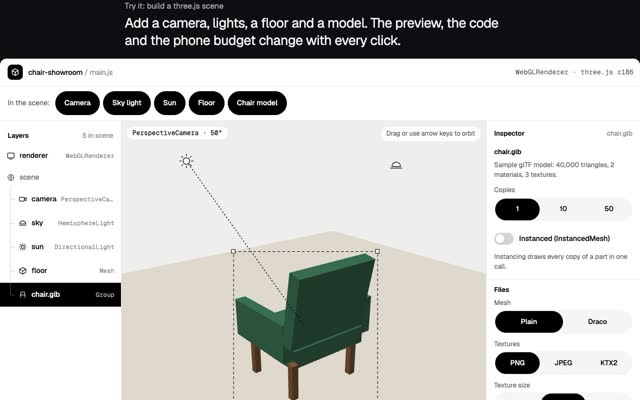
- Draw calls: every mesh is at least one request to draw, so merge static geometry (three.js manual: optimise lots of objects). Use
InstancedMeshfor many copies of one object andBatchedMeshfor many different geometries that share a material (BatchedMesh docs). - Detail by distance: the
LODobject switches between meshes at the distances you set (LOD docs). - Textures: ship KTX2 files with Basis Universal.
KTX2Loadertranscodes them to whatever compressed format the GPU supports (KTX2Loader docs), which covers desktop and phones from one file. - Light: bake it into lightmaps in Blender and use cheap materials, as you would in Unity.
- Measure:
renderer.info.render.callsandrenderer.info.render.trianglesgive you draw calls and triangles per frame (WebGLRenderer docs). - Memory: geometries, materials and textures are not freed on their own; call
dispose()when you remove them (three.js manual: dispose of objects).
// Cap the pixel ratio: a phone at 3x draws far more pixels than at 2x
renderer.setPixelRatio(Math.min(window.devicePixelRatio, 2));

// Compressed textures that suit every GPU
const ktx2 = new KTX2Loader().setTranscoderPath('/basis/').detectSupport(renderer);
const tex = await ktx2.loadAsync('/textures/floor.ktx2');

// Watch the two numbers that matter
console.log(renderer.info.render.calls, renderer.info.render.triangles);
The live Al Hamra page caps the pixel ratio at 2 for the same reason.
When should you stream instead of building for WebGL?
Stream when the visuals cannot be cut down to fit a phone, or when the model must never leave your servers. With Unreal Pixel Streaming the 3D renders on a cloud GPU and every viewer needs their own. One streaming GPU server on AWS costs about $0.53 an hour, so 1,000 people at once is roughly $526 an hour before bandwidth. A WebGL build is one download per visitor, however many come. For a building people browse for leasing or marketing, I build for the browser. I have shipped both routes: at Napster I led a team across Unreal, Unity and WebGL, which I compare with building alone in what one person with AI can ship. I compare the routes for stores, shows and venues in Virtual stores, live shows and 3D worlds people actually use.
Questions people ask
How do I reduce Unity WebGL build size?
Leave out hidden objects, decimate heavy meshes, compress textures, strip code with Managed Stripping Level High and Disk Size with LTO, remove unused packages, and compress with Brotli.
Brotli or gzip for Unity WebGL?
Brotli gives smaller files and needs HTTPS in Chrome and Firefox. Gzip is bigger and works over HTTP and HTTPS. Either way, the server must send the matching Content-Encoding header.
Why does my Unity WebGL build fail to load after upload?
Usually the headers. Compressed files served without Content-Encoding, or the WebAssembly without Content-Type: application/wasm, will fail to load or load slowly. Check them in the browser’s network panel.
How many triangles can a phone browser draw?
There is no single number; it depends on the phone, the shaders, the lights and the draw calls. Measure on a real mid-range device with the Profiler or renderer.info. For reference, the live Al Hamra build draws about 700,000 at once and holds 60 fps on a laptop graphics chip.
If you need a 3D world that opens from a link on a phone, see 3D web experiences or write to me at m@tawfik.tv.