Three.js website: what three.js is, what you need to build a 3D site, and what it costs

three.js is a free JavaScript library that draws interactive 3D inside an ordinary web page, so people open it from a link with nothing to install. A three.js website is a normal page with one canvas in it, where the library draws your models, lights and camera again on every frame.
It is the default way to put 3D on the web. The three package was downloaded 21.4 million times from npm in the week of 6 to 12 October 2026. The current release is r186, published on 24 September 2026, under the MIT licence.
I build 3D for the browser. My GVNR Survivors game is three.js, and my splat window demo renders a Gaussian splat with Spark, a splat renderer for three.js. Here is what you need, code you can copy, how to keep it fast on a phone, and what a build costs.
What is three.js?
three.js describes itself as an “easy-to-use, lightweight, cross-browser, general-purpose 3D library” (README). It does the hard parts for you: the maths of cameras and perspective, the shader code the graphics chip runs, loading 3D files, lights, shadows and materials.
- Two renderers.
WebGLRendererdraws with WebGL.WebGPURendereruses WebGPU and, the docs say, falls back to a WebGL 2 backend where the browser has no WebGPU. - Small for what it does. I bundled the scene below with esbuild: three.js r186 with the glTF loader and orbit controls comes to about 159 KB gzipped for WebGL, and about 270 KB with
WebGPURenderer. - Examples with source. The official three.js examples page lists more than 600 demos, each with its code: materials, loaders, physics, post-processing, WebXR and WebGPU. There is also a three.js editor that runs in the browser.
What do you need to build a 3D website?
The three.js manual puts it in one line: to display anything you need a scene, a camera and a renderer. For a real site you add two more.
- A scene. The container. Everything you want drawn gets added to it.
- A camera. Usually a
PerspectiveCamera, set by field of view, aspect ratio and the near and far distances it can see. - A renderer. It draws the scene from the camera into a
<canvas>on your page, once per screen refresh. - Models in glTF. The manual recommends glTF, as
.glbor.gltf, because it is built for fast delivery and carries meshes, materials, textures, animations and cameras. Blender exports it. - Lights. A
MeshStandardMaterialis physically based, so with no light it renders black. A HemisphereLight gives soft light from the sky and cannot cast shadows. A DirectionalLight behaves like the sun and can. AMeshBasicMaterialignores light altogether.
Build one below. Add or remove each part, change its settings, and watch the preview, the code and a phone budget move together. Remove every light to see the black.
Try it: build a three.js scene
Add a camera, lights, a floor and a model. The preview, the code and the phone budget change with every click.
With JavaScript on, this is a small scene editor: you add a camera, a sky light, a sun, a floor and a glTF chair, change their settings, and see a preview, the three.js code and a phone performance budget. The short version: a three.js page needs a scene, a camera, a renderer, lights and a model; on a phone, cap the pixel ratio at 2, ship KTX2 textures and Draco meshes, and use instancing when you repeat an object.
Phone budget mid-range phone
A 390 by 844 point screen at 3x. Sample budgets: set your own after testing on a real phone. The marker is the budget.
main.js generated from your scene
Sample scene. The chair, its file sizes and the budgets are illustrative. The library sizes are measured: three.js r186 with the glTF loader and orbit controls, bundled with esbuild and gzipped, about 159 KB for WebGL and 270 KB for WebGPU.
A minimal three.js scene you can copy
This is a complete page: a camera, two lights, a floor and a glTF model you can orbit. It follows the manual’s installation and first-scene guides, with the version pinned, and I checked it against r186. Serve the folder from a local server, not by double-clicking the file.
<!doctype html>
<style> body { margin: 0; } </style>
<script type="importmap">
{ "imports": {
    "three": "https://cdn.jsdelivr.net/npm/three@0.186.1/build/three.module.js",
    "three/addons/": "https://cdn.jsdelivr.net/npm/three@0.186.1/examples/jsm/" } }
</script>
<script type="module">
import * as THREE from 'three';
import { OrbitControls } from 'three/addons/controls/OrbitControls.js';
import { GLTFLoader } from 'three/addons/loaders/GLTFLoader.js';

const scene = new THREE.Scene();
scene.background = new THREE.Color(0xeeeeee);

const camera = new THREE.PerspectiveCamera(50, innerWidth / innerHeight, 0.1, 100);
camera.position.set(2.5, 2, 3.5);

const renderer = new THREE.WebGLRenderer({ antialias: true });
renderer.setPixelRatio(Math.min(devicePixelRatio, 2)); // a 3x phone screen is not worth the cost
renderer.setSize(innerWidth, innerHeight);
document.body.appendChild(renderer.domElement);

scene.add(new THREE.HemisphereLight(0xffffff, 0x8d7c6a, 1.5));
const sun = new THREE.DirectionalLight(0xffffff, 2.5);
sun.position.set(3, 6, 3);
scene.add(sun);

const floor = new THREE.Mesh(new THREE.PlaneGeometry(8, 8), new THREE.MeshStandardMaterial({ color: 0xb9b4ab }));
floor.rotation.x = -Math.PI / 2;
scene.add(floor);

const model = await new GLTFLoader().loadAsync('/models/chair.glb');
scene.add(model.scene);

const controls = new OrbitControls(camera, renderer.domElement);
controls.target.set(0, 0.5, 0);

addEventListener('resize', () => {
  camera.aspect = innerWidth / innerHeight;
  camera.updateProjectionMatrix();
  renderer.setSize(innerWidth, innerHeight);
});

renderer.setAnimationLoop(() => {
  controls.update();
  renderer.render(scene, camera);
});
</script>
For production, the manual recommends installing three from npm and building with a tool such as Vite, so you ship only what you use. Keep every three.js file on the same version: the manual warns that mixing versions can break the app.
How do you keep a three.js site fast on a phone?
Four numbers decide it. You can read the first two from renderer.info while the page runs.
- Draw calls. Every mesh with its own material is at least one draw call, and each call costs processor time before the graphics chip draws a thing. Fifty copies of a chair with two materials is 100 calls. As an
InstancedMeshit is 2. Shadows draw every shadow caster a second time. - Texture memory. A PNG or JPEG is unpacked on the GPU to 4 bytes a pixel, so one 2048 by 2048 texture takes 16 MB, plus a third more for its smaller mipmap copies. JPEG makes the download smaller, not the memory. KTX2 textures stay compressed on the GPU, at about 1 byte a pixel in formats such as ASTC 4x4 and BC7, and three.js’s
KTX2Loaderpicks the format each device supports. - Pixels. A phone screen of 390 by 844 points at 3x is 2.96 million pixels a frame. Capped at 2x it is 1.32 million, less than half. GVNR Survivors draws at most 1.75 pixels per screen point. My window demo goes further: when 60 frames average slower than 25 ms, it lowers the resolution a step.
- The first download. Compress meshes with Draco and load the first room first. In my virtual stores the meshes were Draco-compressed and the textures KTX2, streamed from a CDN while the customer looked around. GVNR Survivors is about 4 MB with its 3D models.
I go through draw calls, levels of detail, texture formats and memory in more depth, with the three.js names for each fix, in Unity WebGL on mobile. The rules are the same in both engines.
three.js, Unity WebGL or a splat viewer?
- three.js when the page must open fast from a link, especially on phones: stores, product configurators, branded games, a 3D hero on a marketing site. You write JavaScript, and the library is one of the smallest parts of the download.
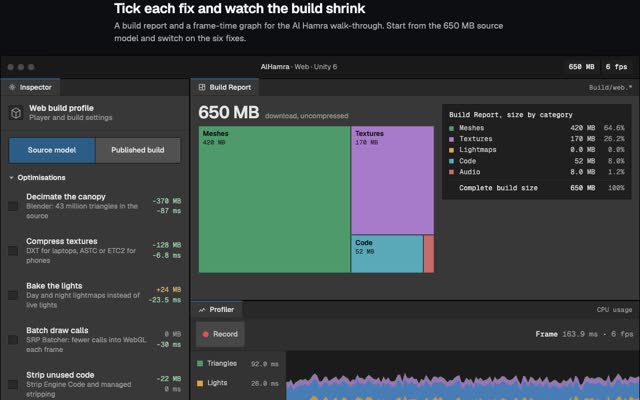
- Unity for the web when the model is heavy or the same project also ships as an app. It brings an editor, baked lighting and a bigger first download. My route from a 650 MB construction model to a 74 MB browser build is in Unity WebGL on mobile.
- A Gaussian splat viewer when you want a real place or object exactly as the camera saw it, scanned from photos instead of modelled. Spark draws splats inside a three.js scene, so you can mix both. How to capture and publish one is in Gaussian splatting on a website.
There is a fourth route, streaming a game engine from a cloud GPU, for when the visuals cannot be cut down to fit a phone. It costs a GPU per viewer for as long as they stay, which is why I build for the browser first.
What does a three.js website cost?
The library is free. Its MIT licence allows commercial use, as long as you keep the copyright notice. A three.js site is static files on a CDN: each visitor downloads it once, and there is no server rendering frames per viewer.
The build is custom web work. Clutch’s web development pricing guide, updated 21 September 2026, says web development projects on its platform typically cost less than $10,000, puts the average agency project at $66,499.09, and says most agencies charge $25 to $49 an hour. A 3D site sits in the same market with extra work on top: models built or cleaned to a budget, lighting, and testing on real phones.
Four things set the price and the timeline: how many products or rooms are rebuilt in 3D, how real they must look, how many people are in it at once, and whether it runs once live or stays open. Bring the 3D files you already have: a clean CAD or glTF model to start from saves modelling time.
Questions people ask
Is three.js free for commercial use?
Yes. It is MIT licensed, so you can use it in paid and closed-source work. Keep the licence notice with the code.
What is the difference between three.js and WebGL?
WebGL is the browser’s low-level graphics interface. three.js sits on top of it, and on WebGPU, and gives you scenes, cameras, lights, materials and model loaders, so you write far less code than WebGL alone needs.
Do I need React to use three.js?
No. three.js is plain JavaScript and works on any page. If your site is already React, React Three Fiber is a React renderer for three.js, also MIT licensed.
Where can I find three.js examples?
On threejs.org/examples, with source for every demo. To see one on a phone, play GVNR Survivors or open my window demo.
Does three.js work on iPhone and Android?
Yes, in the browser, through WebGL 2, and through WebGPU where the browser supports it. Whether it runs well depends on draw calls, textures and pixel ratio, so test on a real mid-range phone.
If you want a 3D store, configurator, game or product page built in three.js, see 3D web experiences or write to me at m@tawfik.tv.