Vibe coding security checklist: 13 checks a founder can run in an afternoon

Vibe coding is safe enough to ship if you run a security pass before real people use the app. AI writes code that works. It rarely checks who else can use it, so the checks below are on you, and none of them needs a security background.
The risk is measured. In July 2025, Veracode tested more than 100 AI models on 80 coding tasks: when a task could be written safely or unsafely, the models chose the unsafe way 45% of the time, and they failed to defend against cross-site scripting in 86% of cases (Veracode, 30 July 2025).
I build and ship apps with AI. I built a shared wedding photo app on my own with AI, about 100 guests used it on the day and nothing broke (the full story). I have moved apps onto Supabase and fixed database security on live ones, and I built a guard for AI coding agents. This is the list I run before anything goes live.
What are the security risks of vibe coding?
The same few mistakes, at scale. They are the top of the OWASP Top 10:2025: broken access control is number one, and software supply chain failures are number three.
- Open databases. In May 2025, Matt Palmer scanned 1,645 apps from Lovable’s public showcase and found 170 whose Supabase tables anyone could read or write, because Row Level Security was missing or wrong (his statement; filed as CVE-2025-48757, which Lovable disputes).
- Leaked keys. GitGuardian counted 28,649,024 new secrets pushed to public GitHub in 2025, up 34% in a year. Secrets for AI services alone rose 81% to 1,275,105 (State of Secrets Sprawl 2026).
- Agents with too much power. A coding agent holding your keys can delete a production database. It has happened, and I wrote up how to stop it.
What does a vibe-coded app look like to a scanner?
Like this. The repo below is made up, but every alert in it maps to one step of the checklist. Open an alert to see the exact line, press Show fix for the change, then commit it. Criticals first: the grade will not leave F until they are gone.
Try it
A guest list app built fast with AI, run through the checklist. Open each alert, read the flagged line, commit the fix and watch the grade.
- Critical: secret key committed to the repo (
.env) - Critical: secret key shipped in the browser bundle (
lib/supabase.ts) - Critical: guest table readable by anyone, RLS off (
supabase/migrations/0001_guests.sql) - Critical: Next.js version with a known middleware bypass (
package.json) - High: admin check trusts data the user can edit (
app/api/admin/export/route.ts) - High: request body saved without checks (
app/api/rsvp/route.ts) - High: login has no rate limit (
app/api/auth/login/route.ts) - High: AI provider key called from the browser (
app/components/Chat.tsx) - High: uploads accept any file, any size (
app/api/upload/route.ts) - High: coding agent runs with approvals off (
.codex/config.toml) - Medium: development points at the production database, database errors sent to the browser, CORS trusts any site, passwords written to logs, migrations run with no backup first
Code scanning
Scan of main against the 13-step vibe coding checklist
Files
A made-up repo for this demo. The flagged patterns and the fixes are real code.
The vibe coding security checklist
Work through it in this order. The first six are where real data leaks from.
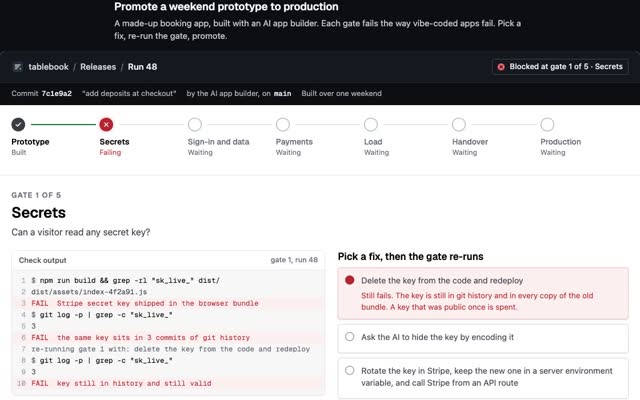
1. Get secrets out of the repo and the browser bundle. A key in git is public to everyone who can ever see the repo, and deleting the file does not remove it from history. A key in the browser bundle is public to every visitor. Next.js inlines any variable named NEXT_PUBLIC_ into the JavaScript it sends to the browser (Next.js docs), and Vite does the same with VITE_, warning that those variables “should not contain sensitive information such as API keys” (Vite docs). Check both:
# is .env tracked by git?
git ls-files | grep -E '(^|/)\.env'

# secrets anywhere in history
git log -p | grep -nE 'sb_secret_|sk_live_|sk-proj-|PRIVATE KEY'

# secrets in the built app
npm run build
grep -rlE 'sb_secret_|sk_live_|sk-proj-' .next/static dist build 2>/dev/null
Anything found: rotate the key first, then clean up. A key that has been public once is spent.
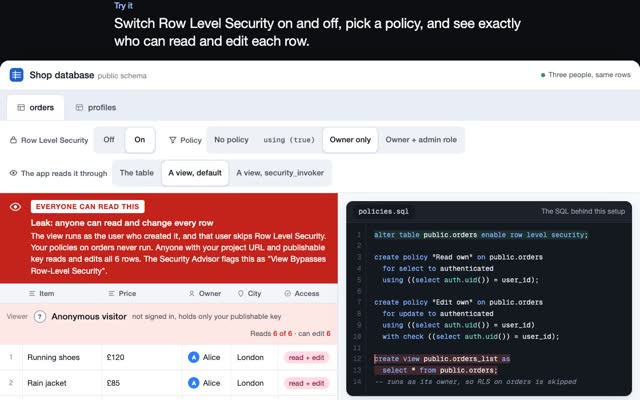
2. Lock down auth and database access. Turn on Row Level Security on every table, write owner-only policies, and never check roles against data the user can edit, such as Supabase’s user_metadata. Then sign out and call your API with only the public key: you should get nothing back. My Supabase security checklist has the SQL for each step.
3. Validate input on the server. Check type, length and format for every field, accept only the fields you expect, and refuse the rest. Checks in the browser are for the user’s convenience. Anyone can skip them.
4. Rate-limit anything that costs money or guards a door. Login, sign-up, password reset, one-time codes, anything that sends an email or a text, and anything that calls a paid AI API. Without a limit, a script can try thousands of passwords or spend your monthly budget overnight. Use your host’s firewall rules, a counter in Redis, or your auth provider’s limits.
5. Audit your dependencies. AI tools can suggest the versions in their training data, which may be out of date. A real example: Next.js versions from 14.0.0 up to 14.2.24 let a crafted request skip middleware, including login checks, rated critical at 9.1 (GitHub advisory for CVE-2025-29927).
npm audit --omit=dev
npm audit fix          # safe upgrades only
npm outdated           # what is behind
Turn on automatic dependency update pull requests in your repo host so this keeps happening without you.
6. Keep third-party API keys on your server. AI, payments, email, maps: if the browser calls the provider with your key, the key is in the page source. Move the call into your own API route, read the key there, and set a spend limit in each provider’s console. Map keys that must sit in the browser get restricted to your domain.
7. Separate development from production. Different databases, different keys. Your laptop, your test seeds and your coding agent should never be able to reach the data real users put in. A local database or a staging project does the job.
8. Stop error messages leaking data. Raw database errors and stack traces show table names, columns and file paths. Log the detail, show the user a plain message, and turn off debug mode in production.
9. Restrict file uploads. Allow only the file types you need, cap the size, store files under random names in a folder per user, and keep the bucket private. The file type the browser reports can be faked, so check the first bytes on the server too.
10. Set CORS to your own domains. An API that echoes back whichever site asks, with credentials allowed, lets other websites read its answers. List your domains. If only your own site calls the API, send no CORS headers at all.
11. Log the right things, and never the secrets. Log sign-ins, failed sign-ins, permission errors and admin actions, so you can see an attack happening. Never log passwords, tokens or whole request bodies. OWASP lists logging and alerting failures at number nine.
12. Keep a backup you have restored. A free Supabase project gets no automatic daily backups. Dump the database on a schedule and before every migration, and restore one copy into a scratch project once, so you know it works.
13. Put a guard on the coding agent itself. The agent that wrote the app has a shell and your keys. Keep approvals on, put deletes, git push and database clients on the ask list, deny reads of .env, and give it a read-only database user pointed at staging. The settings for Claude Code, Cursor, Codex and Gemini CLI are in how to stop an AI agent deleting your database. For a live check, I built GVNR, a free, source-available guard that runs on your own machine and works with Claude Code, Cursor, Codex, Gemini CLI and any other MCP client: before each action it decides allow, deny or ask a person, and it keeps a hash-chained record of every decision. If your agent connects to tools over MCP, the MCP security checklist covers that side.
Can I ask the AI to check its own code?
Yes, as a first pass. Paste this list into your coding agent and ask it to go through the repo step by step and show you the lines it changes. Then check the results yourself, the way an attacker would: sign out and call your API, search the built JavaScript for keys, upload a file you should not be allowed to. The model that wrote the hole is not the best judge of whether it is closed.
I do this kind of pre-launch pass as part of my forward deployed work.
Questions people ask
Is vibe coding safe?
It is as safe as the checks you run before launch. The code works; the gaps are in access control, keys and limits. Run the 13 checks above and you close the ones that cause most real leaks.
Is AI-generated code secure?
Often not by default. Veracode found AI models chose the insecure way to write code 45% of the time across 80 tasks. Treat AI code like code from a fast junior developer: useful, and reviewed before it ships.
What is the biggest security risk in a vibe-coded app?
Broken access control: a database anyone can read, or a secret key shipped to the browser. It is number one in the OWASP Top 10:2025 and the cause of the Lovable showcase leaks.
How long does a security check take?
An afternoon for a small app, if you go in order. Secrets, database access and dependencies take the first hour or two. The rest are settings and short code changes.
Do I need a security expert?
Not for this list. You need one before you handle payments, health data or anything regulated at scale, and a penetration test before a big launch is money well spent.
If you need an app checked and fixed before launch, write to me at m@tawfik.tv.