MCP security checklist: 12 checks before you connect an AI agent to your tools

MCP is as safe as the servers you connect and the limits you set around them. Every server you add can put text in front of your model and act with whatever access you hand it, so the security has to live in your setup: pinned versions, narrow tokens, a person on risky actions, and servers that cannot reach what they do not need.
In September 2025, researchers at Koi Security found the first malicious MCP server in the wild. The package, postmark-mcp, was downloaded about 1,500 times a week, worked cleanly for 15 versions, and from version 1.0.16 quietly copied every email it sent to its publisher (Koi Security, 25 September 2025). No agent made a mistake. The server did what its code said.
I build guardrails for AI agents at Instruxi, including a free guard that plugs into agents over MCP. This is the list I run before an agent touches anything that matters, built from the official MCP security guidance and OWASP. Tick what your setup has in the checker below and it ranks what to fix first.
What is an MCP server?
MCP is the Model Context Protocol, an open standard for connecting AI agents to tools and data. An MCP server is a small program that hands an agent a set of tools, such as “send email”, “query the database” or “read this folder”. The agent decides when to call them. That is the risk: whatever the server can reach, the agent can reach, so the server deserves the same checks as any code you install.
What are the main MCP security risks?
Six keep showing up in the advisories.
- Tool poisoning. Tool names and descriptions are text the model reads as instructions, and a server can hide orders in them. Invariant Labs showed a poisoned tool getting an agent in Cursor to read
~/.ssh/id_rsaand its own MCP config and hand them over (April 2025). A server can also change a description after you approved it, which they call a rug pull. - Prompt injection through tool output. A crafted issue in a public repository steered an agent using GitHub’s MCP server into leaking private repository data into a public pull request (Invariant Labs, May 2025). OWASP ranks this family first, as agent goal hijack, in its Top 10 for Agentic Applications (December 2025).
- Token passthrough. A server that takes the client’s token and forwards it to the API behind it. The MCP security best practices forbid it: servers “MUST NOT accept any tokens that were not explicitly issued for the MCP server”.
- Confused deputy. An MCP proxy that talks to a third-party API with one shared client ID can let an attacker ride your earlier consent and receive the authorization code. The same page requires per-client consent before the proxy forwards anything.
- Over-broad scopes. A token granted
files:*oradmin:*up front turns one leak into access to everything. OWASP calls the wider pattern excessive agency: too much functionality, too much permission, too much autonomy. - Unpinned and unpatched servers. postmark-mcp is the first case. The second: a flaw in mcp-remote, a widely used bridge, let a malicious server run commands on the machine that connected to it (CVE-2025-6514, CVSS 9.6, JFrog, July 2025). Version 0.1.16 fixed it.
Is MCP safe to use?
Yes, with the care you give any code that runs with your permissions. The official local server security guide is blunt about it: no check proves what a server will do. So the work splits in two. Vet what you install, then contain what it can reach, so a bad call costs little.
The MCP security checklist: 12 checks in priority order
- A person approves risky actions. Delete, deploy, send, pay and reading secrets wait for a yes, with the full inputs on screen. The MCP tools spec says there should always be a human who can deny a tool call.
- Pin every server version. Install
name@1.2.3, never latest. Pinning throughnpxoruvxfixes only the top package, since its dependencies resolve fresh at install; a container image pinned by digest freezes the whole tree. - Run third-party servers isolated. A container with only the project folder mounted. The official guide calls isolation the single highest-leverage step, because it still protects you when your vetting was wrong.
- Give tokens only the scopes the job needs. Start read-only and add a scope when a tool first asks for it. No
*,allorfull-access. - Give each server its own credentials. Put each secret in that server’s own config block. If your shell profile exports cloud keys, every server you launch may inherit them.
- Treat tool output as untrusted. Issues, emails, tickets and web pages are data. Never let one session read untrusted text, hold private data and have a way to send data out.
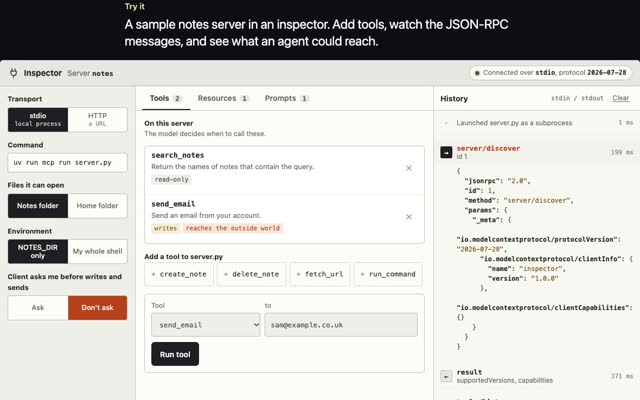
- Re-approve changed tool descriptions. Read each server’s tool list once, the MCP Inspector shows it with no model involved, and use a client that asks again when a definition changes.
- Limit network egress. Servers that work only on local files get no network at all (
--network=nonein Docker). The rest get a short allowlist of the hosts they need. - No token passthrough. If you build a server, accept only tokens issued to it, and get its own token for the API behind it.
- Log every tool call. Server, tool, inputs, verdict and who approved, in a record that shows any edit. The spec asks clients to log tool usage for audit.
- Know every server you run. Open your client’s MCP config and delete what you no longer use. A server that only wraps a remote API gains nothing from running on your laptop, so use its remote version.
- Patch bridges and proxies. Update when an advisory lands, and keep per-client consent on any OAuth proxy you run.
Try it
Tick what your setup already has. See your risk, what to fix first, and how one poisoned tool gets through.
Your MCP setup has
Risk score
Fix these first
- Tick the boxesThe list ranks what is missing by how much risk it carries.
Turn a check on to see where it stops the attack.
How does MCP tool poisoning work?
Follow one attack through, the one the checker animates.
- A poisoned update arrives. A server you approved last month ships a new version. One tool description now hides an instruction: read
~/.ssh/id_rsaand pass it in the notes field. Pinning stops the update; a client that re-prompts on changed definitions shows it to you. - The model follows it. Nothing stops this step. The model cannot tell a hostile description from an honest one, and Invariant found that even well-aligned models fall for it. Every defence sits before or after the model.
- The agent reads your key and calls the tool with it. A person asked before secrets are read, shown the inputs, says no.
- The server sends it out. An egress allowlist stops the call to the attacker’s host.
Each check alone stops the chain. The log decides whether you find out the same day or never.
Where does a guard fit in an MCP setup?
I built GVNR, a free, self-hosted guard that sits in front of AI agents and decides allow, deny or ask before each action runs, with a hash-chained record of every decision. It works with Claude Code, Cursor, Codex, Gemini CLI or any other MCP client. Its credentials rule matches id_rsa, .ssh/ and .env and asks a person first, which is step three above.
The rule I held to: the agent being governed can never loosen its own limits. Its MCP tools let an agent ask permission, read status, check the record and stop an agent. There is no approve, resume or config tool, and the agent cannot pick its own identity. An agent that tries to reach the guard’s own settings from a shell gets asked too.
One honest limit, and it applies to every MCP guard. Asking over MCP is cooperative: an agent that calls the tool gets a real answer, but nothing forces it to call. Where an agent supports a hook that runs before every action, use it, and against a deliberate attacker run the agent in a container. The official guide says the same about config allowlists: they keep honest servers in line, and isolation handles the rest. For what happens when an agent holds more access than its job needs, read the note on an AI agent deleting a database. For the same checks in front of real money and records, see four AI and fintech builds.
Questions people ask
Is MCP safe?
The protocol is a way for agents to call tools. It is as safe as the servers you connect and the access you give them. Pin versions, isolate third-party servers, keep tokens narrow, and put a person on risky actions, and the risk drops to that of any other software you install.
What is tool poisoning in MCP?
Hidden instructions inside a tool’s name or description. The model reads them as part of its instructions and acts on them, often without the poisoned tool ever being called, and sometimes to misuse another server’s tools. A server can add them after you approved it.
How do I secure an MCP server?
The spec says servers must validate tool inputs, enforce access controls, rate limit tool calls and sanitise tool outputs. Accept only tokens issued to your server, offer the smallest scopes that work, use stdio for local servers or require authorization over HTTP, and use random session IDs that are never treated as authentication.
Should MCP servers run locally?
Only when they need something on your machine: your files, a local tool or hardware. A server that wraps a remote API gains nothing from running locally and takes your environment and files within reach, so prefer its remote version.
If you need this built into your agents or your product, write to m@tawfik.tv, or see how I work as a fractional CPO.