MCP server: what it is, what it exposes, and how to build one

An MCP server is a small program that hands an AI application a set of tools, data and prompt templates through the Model Context Protocol, so any MCP client can use them without custom glue code. You write it once, and Claude Code, Cursor, Codex, Gemini CLI and any other MCP client can connect to it, ask what it offers and call it.
The ecosystem got big fast. By 9 December 2025 there were more than 10,000 active public MCP servers and over 97 million monthly SDK downloads across Python and TypeScript, when Anthropic donated the protocol to the Agentic AI Foundation under the Linux Foundation (Anthropic, 9 December 2025).
I lead product for GVNR at Instruxi, a free, source-available guard that plugs into agents over MCP. Designing its tool list taught me that the tool list of a server is its security design. This page covers what a server is, a working one in about 30 lines of Python, how to connect it, and how to ship it without handing an agent more than it needs.
What is an MCP server?
An MCP server is a program that exposes tools, data and prompts to AI applications over the Model Context Protocol, an open standard for connecting AI apps to the systems they work with. Anthropic introduced MCP in November 2024. There are three roles:
- The host is the AI app the person talks to: an IDE, a coding agent, a chat app.
- The client lives inside the host and speaks MCP, one client per server.
- The server is what you build. It exposes capabilities and never talks to the model directly.
Messages are JSON-RPC 2.0. The current spec is version 2026-07-28, released on 28 July 2026, and it changed how a connection starts (more on that below). If you only want the short version and the risks, my MCP security checklist has both. This page is for the person building one.
What does an MCP server expose?
Three kinds of thing. What separates them is who decides to use them, as the Python SDK’s first steps puts it:
- Tools are functions the model decides to call: search, create, send, deploy. A tool can change things.
- Resources are data the application loads into the model’s context, addressed by a URI such as
notes://monday.md. Reading one changes nothing. - Prompts are templates the user picks by name, like a slash command.
Each tool can carry annotations: readOnlyHint, destructiveHint, idempotentHint and openWorldHint. Set them honestly, but never rely on them. The spec schema calls them hints and says clients should never make tool decisions from annotations sent by an untrusted server.
Local (stdio) or remote (HTTP)?
There are two standard transports, and the choice decides your security model.
- stdio. The client launches your server as a child process and talks over its stdin and stdout, one JSON message per line. No port is open. The authorization spec says stdio servers should take credentials from the environment, not run OAuth. Anything your server prints to stdout corrupts the stream, so log to stderr.
- Streamable HTTP. Your server listens at a URL, usually ending in
/mcp. This is the one you deploy so other people can use it. The transport spec says servers must check theOriginheader to block DNS rebinding, should bind to 127.0.0.1 when running locally, and should authenticate every connection. Authorization is based on OAuth 2.1.
My rule: stdio when the server needs something on your machine, HTTP when other people or other machines need it.
What changed in the 2026-07-28 spec?
Most tutorials still open with an initialize handshake. The 2026-07-28 changelog removed it, along with protocol-level sessions. Every request now carries its protocol version, client identity and capabilities in _meta. Servers must answer a new server/discover request listing their versions and capabilities. The Python SDK’s v2 renamed FastMCP to MCPServer and speaks the new version while still serving older clients (What’s new in v2). If a guide imports FastMCP, it was written for v1.
How do I build an MCP server?
Here is a complete server in Python with the official SDK: one tool, one resource template and one prompt. I ran it on SDK 2.3.0, the current release, and it answered at protocol 2026-07-28. Official SDKs also exist for TypeScript, C#, Go, Rust, Ruby, Java and more (SDK list).
1. Install the SDK (Python 3.11 or later):
uv add "mcp[cli]" # or: pip install "mcp[cli]"
2. Write server.py. It reads notes from one folder and nothing else:
from pathlib import Path

from mcp.server import MCPServer
from mcp.types import ToolAnnotations

NOTES = (Path(__file__).parent / "notes").resolve()  # the only folder it can read
mcp = MCPServer("Notes")


@mcp.tool(annotations=ToolAnnotations(read_only_hint=True, open_world_hint=False))
def search_notes(query: str) -> list[str]:
    """Return the names of notes that contain the query."""
    return [p.name for p in NOTES.glob("*.md") if query.lower() in p.read_text().lower()]


@mcp.resource("notes://{name}")
def read_note(name: str) -> str:
    """The full text of one note."""
    path = (NOTES / name).resolve()
    if path.parent != NOTES:
        raise ValueError("That file is outside the notes folder.")
    return path.read_text()


@mcp.prompt()
def weekly_review() -> str:
    """Summarise this week's notes."""
    return "Search my notes for this week and list the open actions."


if __name__ == "__main__":
    mcp.run()
The type hints become the input schema and the docstrings become the descriptions. mcp.run() with no arguments serves stdio. For HTTP, mcp.run(transport="streamable-http") serves http://127.0.0.1:8000/mcp.
3. Open it in the MCP Inspector, which lists the tools and lets you call them with no model involved:
uv run mcp dev server.py
4. Leave one check behind. The SDK’s Client can connect to the server object in memory, no process and no port, so a broken tool fails before any agent sees it:
import anyio
from mcp import Client
from server import mcp


async def main() -> None:
    async with Client(mcp) as client:
        result = await client.call_tool("search_notes", {"query": "booking"})
        assert result.structured_content == {"result": ["tuesday.md"]}
        print("ok", client.protocol_version)  # ok 2026-07-28


anyio.run(main)
On the wire, a tool call is one line of JSON from the client and one back. This is what my server returned over stdio, trimmed of _meta:
→ {"jsonrpc":"2.0","id":3,"method":"tools/call","params":{"name":"search_notes","arguments":{"query":"booking"}}}
← {"jsonrpc":"2.0","id":3,"result":{"content":[{"type":"text","text":"tuesday.md"}],"isError":false,"resultType":"complete","structuredContent":{"result":["tuesday.md"]}}}
Build it up below: add tools to the sample server, switch transports, and watch what each risky setting lets an agent reach.
Try it
A sample notes server in an inspector. Add tools, watch the JSON-RPC messages, and see what an agent could reach.
With JavaScript on, this is a working MCP inspector for a sample notes server: add or remove tools, switch between stdio and HTTP, call tools and watch the real message shapes (server/discover, tools/list, tools/call), and see which risky settings widen what an agent can reach.
On this server
The model decides when to call these.
Add a tool to server.py
The client wants your OK before this call
Resource template
The app decides when to load these into the model's context.
notes://{name}
The full text of one note.
Prompt
The user picks these by name, like a slash command.
weekly_review
Summarise this week's notes.
History
stdin / stdoutWhat an agent using this server can reach
How do I connect an MCP server to Claude Code, Cursor, Codex or Gemini CLI?
Every client needs the same thing: the command that starts your server. Use absolute paths, because the client launches it from its own working directory (Python SDK, connect to a real host).
# Claude Code
claude mcp add notes -- uv run --with "mcp[cli]" mcp run /absolute/path/to/server.py

# Codex
codex mcp add notes -- uv run --with "mcp[cli]" mcp run /absolute/path/to/server.py

# Cursor: .cursor/mcp.json   Gemini CLI: ~/.gemini/settings.json
{ "mcpServers": { "notes": {
    "command": "uv",
    "args": ["run", "--with", "mcp[cli]", "mcp", "run", "/absolute/path/to/server.py"] } } }

# A deployed HTTP server is a URL instead of a command
claude mcp add --transport http notes https://notes.example.com/mcp
Sources: Claude Code MCP, Codex MCP, Cursor MCP, Gemini CLI MCP.
How do I ship an MCP server safely?
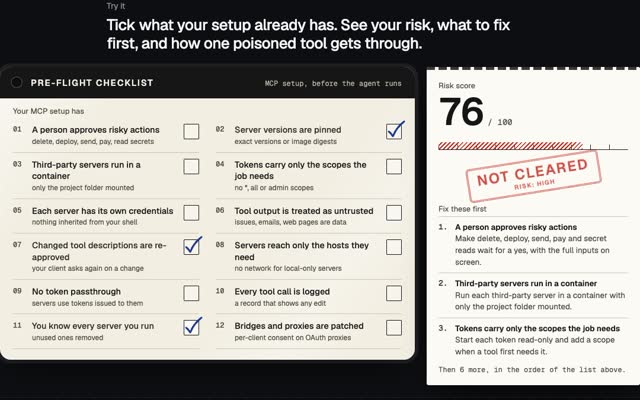
The 12 checks for people connecting servers are in the MCP security checklist. These are the ones that sit with the builder.
- Narrow tools, typed arguments.
search_notes(query)beatsrun_sql(query), and both beatrun_command(command). A catch-all tool makes every other limit decoration. - Validate every input on the server. The tools spec says servers must validate all tool inputs, enforce access controls, rate limit tool calls and sanitise outputs. The folder check in
read_noteabove is that rule in three lines. - Scope what the process can reach. Point it at one folder, not your home folder. Pass only the variables it needs: a stdio server launched from your shell can inherit every key in it.
- Read-only first. Ship a reader, then add a writer when someone needs it. Mark writes and deletes honestly so clients can ask a person first.
- Return errors as results. A failed call should come back with
isError: trueand a plain message the model can act on. - On HTTP: check
Origin, bind to 127.0.0.1 in development, require sign-in, and accept only tokens issued to your server. Never pass the client’s token through to another API. - Version every release. People should pin your server, so give them versions worth pinning.
Rules 1, 3 and 4 do most of the work. In the inspector above, a read-only notes server reaches one place. Add fetch_url and widen the folder, and the agent can read secrets, read untrusted pages and send data out: everything a leak needs.
Where does a guard fit around MCP servers?
Even a well-built server does exactly what the agent asks. Something has to decide whether the agent should ask. GVNR works with Claude Code, Cursor, Codex, Gemini CLI and any other MCP client, and decides allow, deny or ask before each action, with a hash-chained record of every decision. It is free and source-available under FSL-1.1-ALv2, so each release becomes Apache 2.0 two years later (code on GitHub).
Its own MCP server follows the rules above. Its tools let an agent ask permission, read status, check the record and stop an agent. There is no approve, resume or config tool, and the agent cannot pick its own identity, so the agent being governed can never loosen its own limits. One honest limit: over MCP, asking is cooperative. Where an agent offers a hook that runs before every action, use it; Claude Code’s hook is wired today.
For how this fits a wider programme of identity, limits and records, read AI agent governance. For what agents are and when they need tools at all, see agentic AI.
Questions people ask
What is an MCP server in simple terms?
A program that tells an AI app “here are the things I can do and the data I have”, in a format every MCP client understands, and then does them when asked.
What is the difference between an MCP server and an API?
An API is built for developers who read its docs. An MCP server describes itself to the model at runtime: names, descriptions and input schemas. Many MCP servers are thin wrappers around an existing API.
Does MCP still use the initialize handshake?
Not from version 2026-07-28. Each request carries its protocol version in _meta, and servers answer server/discover. Older clients still send initialize, and the official Python SDK serves both.
Should I write an MCP server in Python or TypeScript?
Whichever your team already runs. Both are Tier 1 official SDKs, alongside C#, Go, Rust and Ruby. The server’s design matters more than the language.
If you need MCP servers, agents or the guardrails around them built into your product, write to m@tawfik.tv or see how I work as a fractional CPO.