Low latency streaming: why your live stream is delayed, and how to cut it

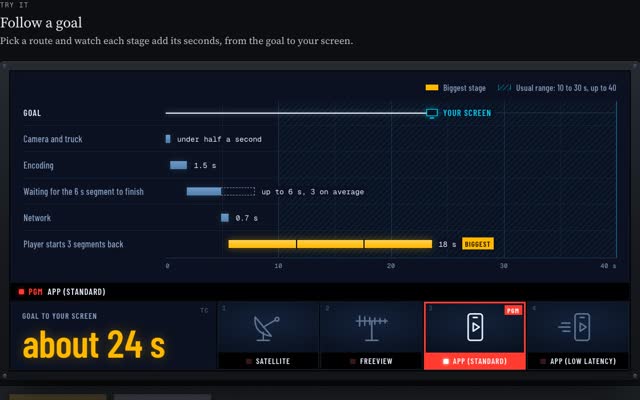
A live stream is delayed because the video is cut into segments, usually 2 to 6 seconds long, and the player waits for about three of them before it starts. With 6-second segments that is 18 seconds of waiting before anything else is added, which is why apps run 10 to 30 seconds behind while TV runs about 6.
Low latency streaming shrinks the chunks. Low-Latency HLS and low-latency DASH bring an app down to TV’s range, a few seconds. WebRTC goes under a second, at a higher cost per viewer.
In Bitmovin’s 9th Video Developer Report (survey run July 2025), 39% of video teams reported under 5 seconds end to end, 40% sat between 10 and 30 seconds, and 21% did not measure latency at all.
I have worked at both ends of this. I was technical and transmission manager for Olympic Broadcasting Services at the PyeongChang Winter Olympics, a technical producer on live F1 race coverage, on the engineering team behind Sky Sports’ video players, and a streaming manager at Amazon, including live music streams for Amazon Music. The long version of how a goal travels from the pitch to your phone is on my broadcast workflows page. This is the engineer’s version: where the seconds go, and which protocol buys them back.
Why is my live stream delayed?
Follow one goal from the ground to a phone. Glass to glass, the seconds go here:
- Camera and production. Cameras, the director and replays add well under a second.
- Contribution. The feed travels from the venue to the encoder, often over SRT, which holds packets for a short window so it can resend lost ones.
- Encode. Encoding for picture quality takes a second or two.
- Waiting for the segment. The packager can only publish a segment once all of it is encoded. A 6-second segment is, on average, 3 seconds old when it goes out.
- Origin and CDN. The file is copied to edge servers near the viewer.
- The player buffer. This is the big one. The HLS spec, RFC 8216, says a player should not start less than three target durations from the end of the playlist, because “doing so can trigger playback stalls”. Three 6-second segments is 18 seconds.
So the delay sits at the end of the chain, in the packager and the player. The satellite or the internet is rarely the problem.
Set your own pipeline below, then kick off and watch the same goal reach two phones.
Build a glass-to-glass latency budget
Change the encoder, packager, CDN and player settings. The budget recalculates, and two phones show the same goal arriving.
This tool needs JavaScript. Typical glass-to-glass totals from the same model: standard HLS with 6 s segments, about 24 s. DASH with 4 s segments, about 17 s. Low-Latency HLS with 1 s parts, about 6 s. Low-latency DASH with 0.5 s chunks, about 4 s. WebRTC, under 1 s.
| Protocol | Total | Biggest stage |
|---|---|---|
| HLS, 6 s segments | About 24 s | Player holds 3 segments: 18 s |
| LL-HLS, 1 s parts | About 6 s | Player holds 3 parts: 3 s |
| LL-DASH, 0.5 s chunks | About 4 s | Encode: 1.5 s, player: 1.5 s |
| WebRTC | Under 1 s | Camera and production: 0.4 s |
Glass to glass
Total delay: 0.0s
from the goal at the ground to the viewer's screen
TV broadcast: about 6 s. Standard app: about 24 s.
A model, not a measurement. Camera, encode and network times follow my goal model on the broadcast workflows page. The rules come from the specs linked below the tool.
Checks
- Scale
- Cost per viewer
- When the network wobbles
Same goal, two phones
Kick off and watch the goal reach each phone. The friend on the faster stream texts first.
At the ground 67:21
Your settings
Standard app
What is the lowest latency streaming protocol?
WebRTC. Each protocol has a real range and a job it suits.
- HLS and DASH, standard: 10 to 30 seconds. Segments of 2 to 6 seconds, three held in the player. Apple’s authoring spec still says target durations should be 6 seconds. Use it when reach and price matter more than seconds.
- Low-Latency HLS: TV range. Apple splits each segment into partial segments, for example 200 milliseconds each, and says that brings delay “into the range of standard television broadcasts”. Use it for sport on phones and TVs, especially where Apple devices dominate.
- Low-latency DASH: TV range. The DASH-IF guidelines aim to match broadcast, which they put at 3 to 10 seconds. The packager sends CMAF chunks while each segment is still growing, using HTTP chunked transfer, and the player nudges its playback speed to hold a target latency. CMAF is the shared file format, so one set of chunks can serve both LL-HLS and LL-DASH.
- WebRTC: under a second. Frames go out as they are encoded, with no segments. Cloudflare’s WebRTC docs quote under 500 milliseconds to the viewer. WHIP, published as RFC 9725 in March 2025, standardises the ingest: one HTTP POST, and the encoder is live. Use it when the viewer acts on what they see.
- SRT: contribution, not delivery. SRT moves the feed from the venue to your encoder over the open internet. The SRT draft describes it as ideal for sub-second video, with a 120 millisecond minimum latency and a recommended setting of 3 to 4 times the round trip.
The same Bitmovin survey shows what teams pick for low latency: LL-HLS at 26%, LL-DASH at 19%, WebRTC at 14%, and 28% use none.
HLS vs WebRTC latency: what do you give up?
Every second you cut is paid for in one of three ways.
- Scale. HLS and DASH are plain files. A CDN caches each segment once and serves it to everyone, so the cost per viewer stays low as the audience grows. WebRTC has no HTTP cache in the path: every viewer holds a live connection to a media server.
- Cost. LL-HLS keeps the CDN but multiplies requests. At 0.2-second parts, each viewer asks for five parts a second, plus playlist updates. The CDN also has to support HTTP/2 or HTTP/3 and hold blocking playlist requests, which the HLS second edition draft requires for low-latency serving. If the edge cannot, players fall back to regular latency. You pay for low latency and get the old delay.
- Resilience. A buffer is insurance. Eighteen seconds in hand rides out most network hiccups. Three seconds leaves little room, so low-latency players drop quality or speed up and slow down to stay on target, and a bad network shows up as a stall sooner.
How do I set up Low-Latency HLS?
Start with Apple’s numbers, then tune. Apple’s authoring spec recommends a 1-second part target, keyframes every 2 seconds, and a part hold-back of at least three parts. A media playlist then looks like this:
#EXTM3U
#EXT-X-TARGETDURATION:6
#EXT-X-SERVER-CONTROL:CAN-BLOCK-RELOAD=YES,PART-HOLD-BACK=3.0
#EXT-X-PART-INF:PART-TARGET=1.0
#EXT-X-PROGRAM-DATE-TIME:2026-10-17T15:42:11.000Z
#EXTINF:6.000,
seg2841.mp4
#EXT-X-PART:DURATION=1.000,URI="seg2842.0.mp4",INDEPENDENT=YES
#EXT-X-PART:DURATION=1.000,URI="seg2842.1.mp4"
#EXT-X-PRELOAD-HINT:TYPE=PART,URI="seg2842.2.mp4"
Three things to check before match day:
- Every segment starts on a keyframe. Pick a GOP that divides the segment: 2-second GOPs for 6-second segments.
- The CDN holds blocking requests. Ask your CDN for its LL-HLS support in writing, then test it with a real player at the edge, not the origin.
- Measure glass to glass. Burn a clock into the picture at the venue, film it next to a phone, and compare. A dashboard number from the encoder misses the player buffer, which is the biggest stage.
For low-latency DASH, the equivalent is a target latency in the manifest and segments that are shorter than it, as the DASH-IF guidelines require:
<ServiceDescription id="0">
  <Latency target="4000"/>
</ServiceDescription>
<SegmentTemplate timescale="1" duration="2"
  availabilityTimeOffset="1.5" availabilityTimeComplete="false"
  media="v-$Number$.m4s" initialization="v-init.mp4"/>
And for the contribution link from the venue, set SRT latency to about four round trips. With an 80 millisecond round trip:
srt-live-transmit "srt://:9000?mode=listener&latency=320" udp://127.0.0.1:5000
The latency value is in milliseconds, and the default in live mode is 120.
What latency do live sports, auctions and betting need?
My rule: match the latency to the moment the viewer acts. Here is the checklist I use.
- Live sports. Match the TV, 3 to 6 seconds, with LL-HLS or LL-DASH. Fans hear the neighbours cheer and get score alerts on their phone. A stream 20 seconds behind is a spoiler machine.
- Betting. Under a second, with WebRTC. If a viewer bets on what they see, the picture must not lag the odds. Bitmovin’s survey names WebRTC as the tool of choice for auctions and sports betting.
- Auctions. Under a second, with WebRTC. Every bidder has to see the same lot at the same moment, or the late ones lose.
- Concerts. Standard HLS is often fine. Nobody at home knows the band is 20 seconds ahead, and a big buffer keeps the picture clean on bad Wi-Fi. Go low latency only when fans interact live: chat the artist reads, votes, or shout-outs.
- Interactive shows and quizzes. WebRTC for anyone on stage or on camera, LL-HLS for the audience at scale. Stamp the stream with
EXT-X-PROGRAM-DATE-TIME, which the low-latency profile requires anyway, and close each viewer’s vote against their own picture, so a slower phone still gets a fair answer window.
Those last two are where live streaming meets the platforms I build now: fan engagement platforms with games and rewards timed to the show, and live shows in 3D worlds, where the audience in the room and the audience on video have to see the same beat.
Questions people ask
What is low latency streaming?
Live video delivered with a delay of a few seconds or less from the event to the screen, usually with LL-HLS, LL-DASH or WebRTC. Standard streaming runs 10 to 30 seconds behind.
What is the lowest latency streaming protocol?
WebRTC, at under a second. LL-HLS and LL-DASH reach broadcast TV’s range of a few seconds while keeping CDN scale. SRT is low latency too, but it is for contribution from the venue, not for viewers.
Why is my live stream delayed?
The player waits for about three whole segments before it plays, so 6-second segments add 18 seconds on their own. Encoding and the CDN add a few more.
Is LL-HLS better than WebRTC?
For a big audience watching, yes: it is cheaper and scales on ordinary CDNs. For viewers who bid, bet or talk back, WebRTC is better, because a second matters more than cost.
What is glass-to-glass latency?
The time from light hitting the camera lens to light leaving the viewer’s screen. Measure it with a clock in the shot and a phone beside it, because it includes the player buffer that server dashboards miss.
If you need a live stream, fan platform or interactive show built with the right latency, write to me at m@tawfik.tv.