How much does it cost to live stream an event?

Live streaming an event costs from about $174 for a phone kit you own, to about $517 to hire a three-camera kit for three days, to a crewed production where people cost more than the kit: from about £1,780 a day for five crew in London. The platform can be free.
What usually breaks a stream is the venue’s internet, not the budget. In March 2024 the FCC raised its definition of broadband to 100 Mbps down and 20 Mbps up. YouTube recommends 14 Mbps for a 1080p stream at 30 frames a second, and Vimeo’s rule of thumb is to stream at half of your upload speed. So a line that counts as broadband in the US does not leave enough headroom for that stream.
I’m Mo Tawfik Khalifa. I have worked at both ends of a live broadcast: as a technical producer on live F1 race coverage, as technical and transmission manager at the PyeongChang Winter Olympics for Olympic Broadcasting Services, and as a streaming manager at Amazon, including live music streams for Amazon Music. The same rules apply to a wedding: test the line, mic the voices, record a backup, rehearse. Every price below links to its source, checked on 15 October 2026.
How much does it cost to live stream an event?
Three tiers. Prices are US list prices from the maker, or three-day hire prices from Lensrentals, a US rental house. Crew rates are Bectu’s London live events guidance for 2025/26, for a 10-hour corporate day.
- Phone and gimbal: about $174. Your phone, a DJI Osmo Mobile 7 gimbal at $75 and a DJI Mic Mini kit with two transmitters at $99.
- A small multi-camera kit: about $517 to hire for three days. Three Canon XA60 camcorders at $103 each, three video tripods at $43 each, an ATEM Mini Pro switcher at $29 and a DJI Mic 2 kit at $50. To buy instead: the ATEM Mini Pro is $349 and streams to YouTube, Facebook and Twitch over Ethernet without a computer, and a Blackmagic Studio Camera 4K Plus G2 is $1,555, lens extra.
- A crewed production: kit plus people. Four cameras on hire, three camera operators, a video tech on the switcher and the stream, and a sound technician. Bectu’s professional minimums are £360 for a camera operator and £350 each for a sound technician and a video tech, so those five crew start at £1,780 a day. For a field or a venue with no wired line, add bonded cellular: a LiveU Solo PRO HDMI at $1,795 from a US reseller, plus LiveU’s two-modem Connect kit at $450.
Build your own order below. Pick the event, cameras, sound, venue internet and audience; the kit list, the upload meter and the run of show follow.
This kit builder needs JavaScript. The three tiers, their sourced prices and the upload speeds each stream quality needs are listed in the article above.
Packing list
Buy: maker's US list price. Hire: Lensrentals, 3 days. Crew: Bectu London live events guidance 2025/26, corporate, 10-hour day, professional minimum to ask-for rate. Prices checked 15 October 2026; tap any price for its source.
Upload headroom
Run of show
Sources. Bitrates: YouTube encoder settings (H.264). Headroom: Vimeo's rule of thumb, stream at half your upload, and its advice on Ethernet on a dedicated network. Platforms: YouTube mobile live, Restream, Vimeo. Crew: Bectu. Music: CCLI, YouTube on copyright in live streams.
How do you live stream an event, step by step?
- Test the venue’s upload speed at the same time of day as the event, from where your kit will sit. Ask for a wired port. Vimeo advises Ethernet on a dedicated, unshared network.
- Pick the quality the line can carry. Set the encoder to half your measured upload or less.
- Mic the voices, not the room.
- Rehearse a real stream to a private or unlisted link and watch it on a phone on mobile data.
- Record locally on the switcher, the camera or the laptop. Vimeo says you should always record your stream locally, whatever your network.
- Go live early with a holding slide, and keep one person watching the stream on headphones.
What upload speed do you need to live stream?
These are YouTube’s recommended bitrates for H.264, with the upload that leaves Vimeo’s half for headroom:
- 720p, 30 fps: 8 Mbps recommended, 3 minimum. Upload: 16 Mbps.
- 1080p, 30 fps: 14 Mbps recommended, 5 minimum. Upload: 28 Mbps.
- 1080p, 60 fps: 17 Mbps recommended, 6 minimum. Upload: 34 Mbps.
- 4K, 30 fps: 42 Mbps recommended, 11 minimum. Upload: 84 Mbps.
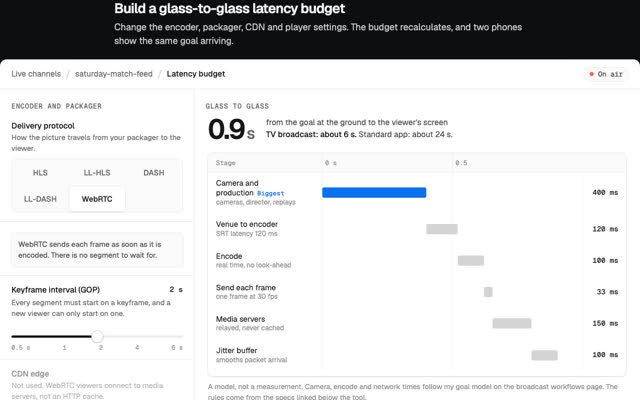
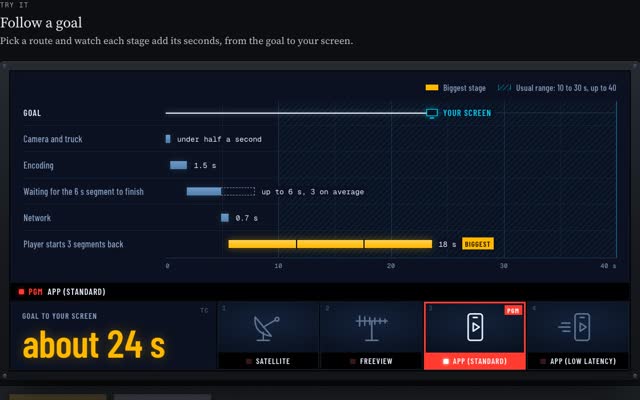
If the line is slower, lower the bitrate before anything else: a steady 1080p stream at 8 Mbps on a 16 Mbps line is better than 14 Mbps that stalls. Your audience size does not change the upload you need. The platform copies your one stream to every viewer. How viewers’ players add delay is in why my stream is behind live TV and in low-latency streaming.
What is the best platform to live stream an event?
- YouTube. Free. You need a verified channel with no live streaming restrictions in the past 90 days, and your first stream may take up to 24 hours to enable. Going live from the YouTube phone app needs at least 50 subscribers. An encoder, like the ATEM or OBS on a laptop, does not.
- Restream. Sends one stream to several platforms. Free for two channels with Restream branding, $19 a month for three, $49 a month for five channels in Full HD, billed monthly.
- Vimeo. Live streaming needs the Advanced plan, $75 a month billed annually or $125 monthly, with registration for up to 100 attendees, Q&A and polls.
For a wedding or a family service, an unlisted YouTube link is enough. For a conference with sign-ups, Vimeo. For reaching people on several platforms at once, Restream.
Audio is the thing people forget
A soft picture is still watchable. A voice you cannot hear is not. A camera mic at the back records the room: echo, chairs, air conditioning. Live TV treats sound as its own job. When F1 went remote it was rigging 90 cameras and 147 microphones at every race, more microphones than cameras.
For your event:
- Wireless lapel mics on whoever speaks: the officiant, the pastor, the speaker.
- A feed from the venue’s sound desk when there is one. Whatever reaches the PA reaches your stream. The ATEM Mini Pro has two 3.5 mm microphone inputs for it.
- Headphones on the stream, not the room, all the way through.
Rehearsals and backups
Live TV plans for the link failing. F1 rehearses switching to its backup every Thursday before a race weekend. At Channel 4, as product owner of the on-demand service, nothing shipped until every release gate passed. Scale that down:
- A rehearsal at the venue, with the real line, at least a day before.
- A local recording running the whole time.
- A second connection: a phone hotspot on a different network, or bonded cellular.
- Charged spare batteries and a second of every cable that matters.
Do you need permission to stream music?
Yes, usually. YouTube scans live streams, and when it finds third-party content a placeholder image may replace your stream, then the stream can be interrupted or ended. That catches a wedding’s first dance and a band playing covers.
- Churches in the US can add a CCLI Streaming License to the Church Copyright License: it covers songs played live by your musicians, from $84 a year for churches already licensed with CCLI, or $108 for an average church of 100 to 199 people. Backing tracks and multitracks need Streaming Plus.
- Sports: the league, club or organiser often controls the streaming rights. Get it in writing.
- Conferences: get speakers’ agreement to stream and record, and to keep the recording up afterwards.
Checklists by event
Weddings. Agree with the couple which parts go out live. Lapel mic on the officiant. One camera on the aisle, one on the couple. Unlisted link sent to guests the week before. Take the first dance off the stream, or expect the platform to cut it.
Church services. Sound desk feed, not a room mic. Licence for the songs. One wide camera, one on the pulpit. The same start time every week, so people can find it. Lifeway Research found 39% of Protestant churchgoers watched a livestream instead of attending in person on more than five occasions in a year (survey of September 2022).
Conferences. The slides as a direct feed from the lectern laptop into the switcher. Sound from the venue desk. Speaker consent. A registration page if attendance matters.
Sports. Rights first. One camera high and central for the wide view. A score on screen. Bonded cellular if there is no wired line at the ground.
The same drawing runs from a phone on a gimbal to a world feed: how live TV and streaming work. Live shows built for the browser are in virtual stores, live shows and 3D worlds.
Questions people ask
How much does it cost to live stream a wedding?
From about $174 in kit with your own phone: a $75 gimbal and $99 of wireless mics, streaming free to an unlisted YouTube link. A three-camera kit hires for about $517 for three days. Crew is extra.
How much does it cost to live stream a church service?
The same kit as any event, from about $174. US churches streaming worship songs also need a CCLI Streaming License, from $84 a year if already licensed with CCLI.
How do you stream a conference live?
Cameras and the lectern laptop into a switcher, sound from the venue desk, a wired line with twice your stream’s bitrate, a local recording and a rehearsal the day before.
What is the best way to live stream an event?
The cheapest setup that meets three tests: you can hear every voice clearly, the venue’s upload is twice your stream’s bitrate, and a backup recording runs the whole time.
Can I live stream an event from my phone?
Yes. On YouTube, going live from the app needs at least 50 subscribers. Below that, stream from an encoder app or a laptop with a stream key.
If you need a live event or a live product built, write to m@tawfik.tv, or see what I build.