Work with me · Trade show displays
Interactive trade show displays and 3D product demos
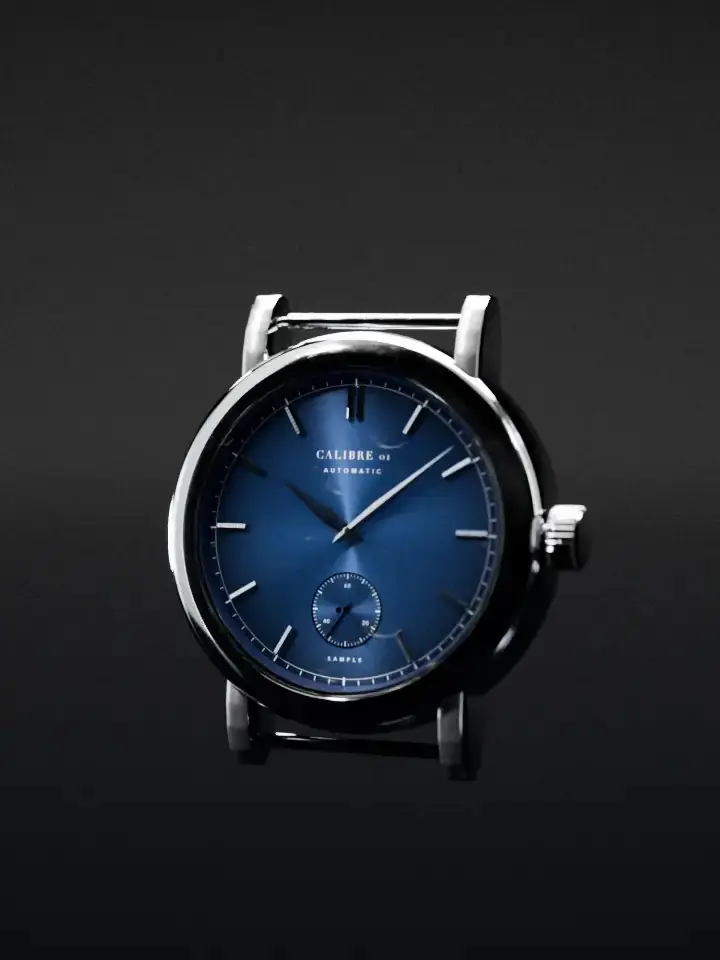
Attract loop · sampleOpening the case backTaken apart · tap a partLive 3D · drag to turn itPutting it back together
Calibre 01
Automatic watch. Invented for this demo, not a product for sale.
Walk up close and it opensMove across it: it turns with you
Loading the next frames
On this device only
Part

Take it home
Scan with your phone camera to put Calibre 01 on your desk or next to your wrist, at its real size: 40 mm across.
Open in ARThe camera starts only when you press the button. Your face position is worked out on this device, in your browser; no image is stored or sent anywhere.
I build the screens on your stand: an attract loop that reacts as people walk past, a touch kiosk where they take your product apart, an AR model they carry home on their phone, and a ranked list of who was most interested for your team at the end of each day.
I build the screens, the interactives and the 3D, not the physical stand. Your stand builder makes the walls and the counters; I work with them so the screens fit the design from day one.
Information desk
Worried the show will not pay for itself?
Swapcard, an events software company, asked 500 exhibitors what holds them back. Their Exhibitor Friction Report is a vendor report, but it names the worries plainly. Here is how I handle each one.
“Proving ROI when activity is spread across multiple systems”Swapcard Exhibitor Friction Report
On the first call we pick one number: demos given, meetings booked or scored leads. The screens are built to count that number, so every stop, tap and take-home adds up in one list, not across three tools.
“They leave with incomplete leads, fragmented data, and difficulty justifying next year’s budget”Swapcard Exhibitor Friction Report
Each evening your team gets a ranked list of who was most interested, with a next step for each person, ready for your CRM that night. You can try the team view in the kiosk below: press End the day.
“Generating and engaging leads at scale”Swapcard Exhibitor Friction Report
A screen that turns to follow people walking past is built to make them stop. Touching it takes the product apart, and the QR code sends it home on their phone in AR, so your team talks to people who already chose to look closer.
Paying for something that only works for three daysNot from the report
The kiosk runs from local files, so it keeps going when the show wifi drops. You own the code and the 3D model from day one, and after the show the same build opens on your website as a virtual booth.
- You own it. The code, the 3D model, the accounts and the files, from day one.
- A fixed price in writing after the first call, before any work starts.
- A live link every week, so you can open the screens on your own phone as they are built.
- A written handover, so your team or your next show partner can run it without me.
Stand A01 · Flagship demo
A screen that sees you
A real booth kiosk, running in your browser. Left alone it plays its attract loop: Calibre 01, a watch I invented and built in 3D for this demo, turning in the light. Move across the screen, or press Try it with your camera and walk past, and it turns to follow you. Touch it and it opens its case back and comes apart, every part named. Then it is yours to turn, pull apart and tap, and to take home in AR at real size. The team panel shows what the booth staff would see.
Stand A02
What I build for trade shows
People searching for trade show booth design usually need two things: a stand and something on it worth stopping for. In Google Keyword Planner, “trade show booth design” gets 1,000 to 10,000 searches a month across the US, the UK, the UAE and Saudi Arabia, at top-of-page bids up to $48 a click (my pull, 18 October 2026). I build the second part.
Attract loopsproduct launch video
Silent loops for the big screen that show the product in the first seconds, not the logo. Rendered from your 3D model, so the launch film, the stand loop and the social cuts all match.
Touch kiosksinteractive kiosk software
Tap a part, see how it works, open the spec. Built as a web app that runs full screen in a kiosk browser from local files, so it keeps going when the show wifi drops.
Walk-past tracking and ARtrade show interactive display
Screens that turn the product to follow people as they walk past, like the watch above, and a QR code that puts the product at real size on the visitor’s own phone to take back to the office.
Lead scoringtrade show lead capture
Every stop, tap and take-home adds to an interest score. At close the team gets a ranked list with the next step for each visitor, ready for the CRM that evening.
The booth after the showvirtual booth, virtual showroom
The same 3D runs in a browser, so the stand stays open online: a virtual booth for people who missed the show, or a virtual showroom on your website.
The physical standtrade show booth design
Not mine. Walls, floors, counters, rigging and power come from a stand builder. I work with yours, or with one you pick, and fit the screens, heights and cable runs into their drawings.
Stand A03
How a project runs
Trade shows have one date that never moves. The plan works backwards from the doors opening, with the 3D model first because it feeds everything else.
- 01 · Call
The brief
The show, the stand, the product and the one number that matters: demos, meetings or scored leads.
- 02 · Model
The 3D
Your product rebuilt from CAD or drawings, accurate enough for engineers to trust.
- 03 · Screens
Loops and kiosk
The attract loop, the touch flow, the AR take-home and the lead score, tested on a phone every day.
- 04 · Fit
With the stand builder
Screen sizes, heights and cables agreed against the stand drawings and the organiser’s rules.
- 05 · Show days
Live
Runs offline on the real screens. The team sees the ranked list each evening.
- 06 · After
Online
Leads exported, the stand reopened as a virtual booth, and the numbers for the next show.
Stand B01
Work you can open
I have built live systems and real-time worlds for more than 20 years. Months before Expo 2020 Dubai opened, the master plan model stood next to a tablet running the interactive plan, and you could find your way round pavilions that did not exist yet. That model-plus-screen pattern is what a good stand does.
The method behind this kiosk on machines: one model feeding the films, the interactive 3D and the AR.
Note · virtual worldsVirtual stores, live shows and 3D worldsMy team of 12 worked on Virtual Expo Dubai, the whole Expo site in real-time 3D. The Expo closed; the twin is still live.
Lab · head trackingThe screen is a windowThe head and tilt tracking this kiosk uses, on a real scanned room.
Note · scanningGaussian splatting on a websiteHow a real place becomes a 3D scene that opens on a phone.
Service · industrialIndustrial website design and 3DFilms, interactive 3D and AR on product pages for equipment makers.
Stand B02 · Free tool
Booth screen planner
Tell it your stand and your goals. It places your screens, gives each one a job and a content loop, and lists what to count during the show. Plain rules of thumb from building live screens, no prices, and nothing you type leaves this page.
Screens and their loops
What to count during the show
The arithmetic
Stand B03
What to bring to the first call
None of this has to be finished. Rough is fine; it just tells me where the hard parts are.
- The show and the stand. Show name, dates, stand size, open sides and your stand builder if you have one.
- The product files. CAD, STEP or drawings, plus photos. If there is only a brochure, we start there.
- The screens. What you own or plan to rent: sizes, portrait or landscape, touch or not.
- The one number. Demos given, meetings booked or scored leads. One, so the screens can be built around it.
- Last show’s numbers, if you have them: passers-by, badge scans, meetings. They become the targets.
- Brand guidelines and the people who must approve the content before it goes on the stand.
Stand C01
Questions buyers ask
Straight answers, including what I do not do.
Do you do trade show booth design?
I design and build what plays on the stand: the screens, the touch kiosks, the 3D and AR, and the content loops. I do not build the physical stand. That comes from a stand builder, and I work with yours or with one you choose, so screen sizes, heights and cabling are decided together with the stand drawings.
What is an interactive trade show display?
A screen on your stand that responds to people instead of only playing a video. It can react when someone walks up, let them tap a part of your product to see how it works, hand them the 3D model on their phone, and tell your team which visitors were most interested.
Can you make an exploded view of our product?
Yes. The watch above is the method: a detailed 3D model of the product, prerendered films for the photoreal moments, and the same model live in the browser so visitors can take it apart themselves and tap each part to see what it does. It works for anything with an inside worth showing: machines, devices, instruments, and the films double as launch and social cuts.
What interactive kiosk software do you use?
I build each kiosk as a web app that runs full screen in a kiosk browser, on the screens you rent or own. It loads from local files, so it keeps working when the show wifi drops, and the same build opens on your website after the show.
How does trade show lead capture work with an interactive display?
Each interaction adds to an interest score: stopping, opening parts, staying, taking the model home. The score only attaches to a person when they scan their badge or choose to leave details, and at the end of the day your team gets a ranked list with a suggested follow-up for each visitor, ready for your CRM.
Is the camera tracking private?
In the demo on this page the camera only starts when you press the button, and your face position is worked out in your browser. No image is stored or sent. On a real stand I build it the same way: on the device, counts and positions only, with a clear sign at the screen. Check the plan with your data protection lead before the show.
Can you build a virtual booth or a virtual showroom too?
Yes. The 3D model built for the stand also runs in a browser, so the booth can stay open online after the show closes. My team of 12 worked on Virtual Expo Dubai, the whole Expo site in real-time 3D, and at Napster I built the TAG Heuer virtual showroom.
Do you make product launch videos?
Yes, from the same 3D model: the attract loop for the stand, the launch film for the reveal and social cuts all render from one set of scenes, so the film and the interactive always match.
How early should we start?
When the stand design starts. Screen sizes and positions are best fixed together with the stand drawings, and the 3D model of your product is the part that takes longest, so it should start first.
Stand C02
Bring your next show
Send the show, the stand and the product. I will tell you which screens are worth it and which are not.
- 30-minute call. Your show, your stand, your product and the one number.
- A written plan in 48 hours. Which screens, what each one plays, what to build first, the risks.
- Start, or not. Use the plan with your team, your stand builder or me. I reply to every email within one working day: m@tawfik.tv.