What is an AI agent? The parts, real examples, and the one rule

An AI agent is an AI model that takes actions for you. You give it a job and some tools, such as a web browser, your files or your email, and it works in a loop: look, decide, act, check, until the job is done or it gets stuck.
Agents are still new, even for software developers. In the Stack Overflow 2025 Developer Survey (July 2025), 14.1% said they use AI agents at work daily and 9% weekly, while 52% either don’t use agents or stick to simpler AI tools.
I build agents and the guards around them. I set up an AI help desk for a fintech platform that can read and explain, and can never change an account. I built mlx-agent, an open-source agent that runs open models on a Mac, searches the web and runs commands you approve. And I lead product for GVNR, a free, source-available guard that checks what an agent is about to do before it does it.
What is an AI agent?
Anthropic, which makes Claude, describes agents as “systems where LLMs dynamically direct their own processes and tool usage” (Building effective agents, December 2024). OpenAI’s practical guide to building agents is shorter: “Agents are systems that independently accomplish tasks on your behalf.”
In plain words: a chatbot gives you an answer and you do the work. An agent does the work. Ask a chatbot to book a table for four on Friday and it suggests restaurants. Ask an agent and it opens the booking site, picks a time, fills in the form, and should ask you before it pays the deposit.
“Agentic AI” is the wider term, for systems of several agents and how a business puts them to work. That has its own page: what agentic AI is and how companies deploy it. This page is about one agent and what it is made of.
What are the parts of an AI agent?
Five parts. OpenAI’s guide names the first three as an agent’s core components.
- The model. A language model that reads, writes and decides the next step. It can come from any provider, or run on your own computer.
- Instructions. The job description: what to do, what to avoid, when to stop. Instructions are a request, and the model can get them wrong. Claude Code’s own documentation says it treats its instruction files “as context, not enforced configuration”, and points you to a hook if you need to block an action whatever the model decides (How Claude remembers your project).
- Tools. Each tool is a key to something: a browser, a folder of code, a terminal, an email account, a database, a payment card. Without tools, an agent can only talk. Many tools now plug in through MCP, the Model Context Protocol, which is why the MCP security checklist matters.
- Memory. Most agents start every session blank. In Claude Code’s words, “each Claude Code session begins with a fresh context window.” What carries over is usually a notes file the agent reads at the start: AGENTS.md, “a README for agents” supported by Codex, Cursor and Gemini CLI, or CLAUDE.md for Claude Code.
- The loop. The agent looks at the situation, decides one step, takes it with a tool, checks the result, and goes round again. It stops when the job is done, when it runs out of steps, or when it has to ask you.
Try it on an office. Pick a job for the agent, hand it keys from the cabinet, and see which rooms it can now reach and what it could break in each. Then run a shift and watch the loop.
Pick its job, hand it keys, and see which rooms it can now reach, and what it could break there.
This demo needs JavaScript. In short: an agent can only reach the rooms its keys open. A help desk agent with two read-only keys can look things up and break nothing. Add the refund key and it can move money; add the live database password and one command can delete your customer data. Whatever its keys reach, it can break.
- Model
- A language model. It reads, writes and decides the next step.
- Instructions
- Tools (keys)
- Memory
- A notes file it reads at the start of every shift. Nothing else carries over.
- Loop
- Look, decide, act, check. Repeat until done or stuck.
Floor plan, ground floor
Key cabinet
Each key is a tool. Tap one to put it on the agent's ring.
Shift time card
Watch the loop. The agent looks, decides, acts and checks, one step at a time. When it reaches a door it has no key for, it stops. When the guard is on, anything it can't undo waits for your yes.
What AI agents do people use today?
Coding agents. Claude Code, Cursor, Codex and Gemini CLI read a project, edit files and run commands in a terminal. Each has approval settings that decide which commands need a yes from you first. I list the settings for all four in how to stop an AI agent deleting your database.
Customer support agents. They answer customers from a help centre, look up the customer’s own orders and hand anything else to a person. On the fintech help desk I set up, the agent never gets the platform’s tools that move money. When I tested it by asking it to send a customer’s cash-out to a third party, it refused and passed the conversation to a person. The setup and the prices are in AI customer service agent: what it can safely do.
Browser agents. These drive a web browser for you: search, click, fill in forms. OpenAI says its ChatGPT agent (July 2025) asks permission before actions of consequence, and you can interrupt it or take over the browser at any point. Anthropic says Claude in Chrome (August 2025) asks you before publishing, purchasing or sharing personal data.
Agents on your own computer. mlx-agent runs open models on a Mac, searches the web, reads pages, and runs only the shell commands you approve.
What can an AI agent do, and what can’t it?
It does well at jobs with many small steps and a clear finish line: find the bug and run the tests, answer the question from the help article, compare five pages and fill in one form. It works at any hour and does not get bored of the hundredth look-up.
It cannot:
- Tell your instructions apart from text it reads. A web page, an email or a support ticket can hide orders aimed at the agent. This is called prompt injection. In Anthropic’s own tests of Claude in Chrome, 123 attack cases across 29 scenarios, attacks succeeded 23.6% of the time without its new safety measures and 11.2% with them (Claude in Chrome, August 2025).
- Know that it is right. It can sound certain and be wrong, so the answer should come from a source it links to.
- Remember last week, unless someone wrote it into its notes file.
- Do anything without a tool. Every action goes through a key you handed it.
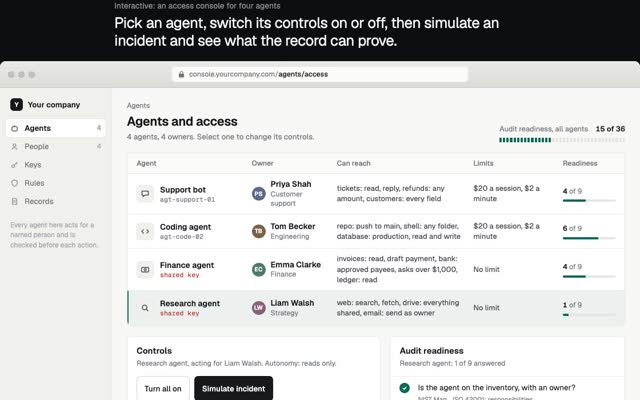
- Take the blame. A person owns what the agent does, so a person should own its keys.
What is the one rule for AI agents?
Whatever its tools can reach, it can break.
An agent with a read-only key to your help centre can, at worst, quote the wrong article. The same agent with the refund button can send money to the wrong place, and with your live database password one command can delete your customer data. In July 2025 an agent on Replit deleted a founder’s database during a code freeze. Telling an agent “don’t” is a request. Taking the key away is a control.
So the safe way to start is short:
- Give it one job with a clear finish line.
- Hand over read-only keys first. Add a key only when the job proves it needs one.
- Make it ask a person before anything it cannot undo: deleting, paying, sending, publishing.
- Keep a record of what it did, and read it.
That is what GVNR does. It is free and source-available under FSL-1.1-ALv2 (code on GitHub), runs on your own machine, and works with Claude Code, Cursor, Codex, Gemini CLI and any other MCP client. Before each action it answers allow, deny or ask a person, and it keeps a hash-chained record of every decision, so an edited line shows. When you have more than one agent, the AI agent governance framework covers owners, identities, limits and reviews.
Questions people ask
What is an AI agent in simple terms?
An AI that does tasks for you instead of only answering. It has a job, a set of tools and a loop: look, decide, act, check, repeat.
What is the difference between an AI agent and a chatbot?
A chatbot answers and you act. An agent holds tools, so it can act itself: edit a file, fill in a form, send an email or issue a refund.
What are examples of AI agents?
Coding agents such as Claude Code, Cursor, Codex and Gemini CLI; customer support agents that answer from a help centre; and browser agents such as ChatGPT agent and Claude in Chrome.
Are AI agents safe?
As safe as the keys you hand them. Start read-only, make anything irreversible wait for a person, and keep a record. A prompt that says “be careful” is not a control.
What is the difference between an AI agent and agentic AI?
An AI agent is one worker with a job and tools. Agentic AI is the wider idea of systems that act on their own, often several agents together. See agentic AI.
If you need an agent built, or guardrails around the agents you already run, write to me at m@tawfik.tv.