AI customer service agent: what it can safely do, and what it costs

An AI customer service agent answers your customers from your own help centre, at any hour, and hands anything it cannot answer to a person with the details attached. Start it read-only: it can look things up and explain them, and it cannot refund, change or cancel anything until you have watched it work.
Customers are open to one, with a way out. In a Gartner survey of 3,566 customers, run in February and March 2026, 50% said service is easier when companies use generative AI, and 87% said it is essential to have an option to reach a human.
I set up an AI help desk for a fintech platform. I bought the agent instead of building one, wrote the help centre it answers from, and held one rule: the agent can read and explain, and it can never change an account. Anything that needs an action goes to a person.
What can an AI customer service agent safely do?
Three jobs, from day one:
- Answer questions from your help centre, with a link to the article it used.
- Look up the signed-in customer’s own records: order status, delivery dates, whether a payment went through.
- Collect the details and hand over, so your person starts with the full picture.
Leave out anything that moves money or changes an account. You can add those later, one at a time, behind a guardrail.
On the fintech help desk, the platform’s admin tools can move money between accounts and complete stuck cash-outs. The agent never gets those tools. When I tested it by asking it to send a customer’s cash-out to a third party, it refused and passed the conversation to a person.
Why does the knowledge base come first?
When an article is missing, the model fills the gap with something that sounds right. Build the knowledge base before you switch anything on:
- Export your last few hundred conversations and list every question that comes up more than once.
- Write one article per question in plain English, with the answer in the first line.
- Write down the rules your team knows by heart: the returns window, what counts as faulty, delivery cut-offs.
- Keep one source of truth. On the fintech desk one file publishes the public help centre, and the agent re-reads that site every week. Nobody edits answers inside the bot.
I also keep a list of phrases the agent must never say, such as “we’ll cover it”, and a check that fails if any article or saved reply contains one.
Should the agent be read-only or allowed to take actions?
Read-only first. Every action you add raises how much the agent resolves, and what one bad conversation can cost. When you add one, put the limits in a check that runs before the action, outside the model. The policy fits on one page:
agent: website-chat
can_read:
  - help_centre
  - orders and payments: signed-in customer only
can_do:                        # day one: read-only
  refund:          ask_person
  change_address:  ask_person
later, one at a time:
  refund:          allow up to £100, own order, duplicate charge confirmed
  change_address:  allow own order, not yet dispatched
answers:
  - only from a help article, linked; otherwise hand over
  - never say: "we'll cover it", "refund approved", "I've sent you a link"
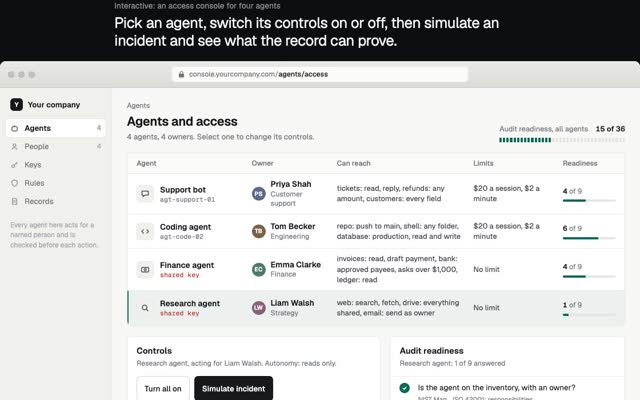
This is the idea behind GVNR, the free, source-available guard I lead for AI agents in Claude Code, Cursor, Codex, Gemini CLI and other MCP clients. Before every action it answers allow, deny or ask a person, and it keeps a hash-chained record of each decision. A support agent needs the same three answers.
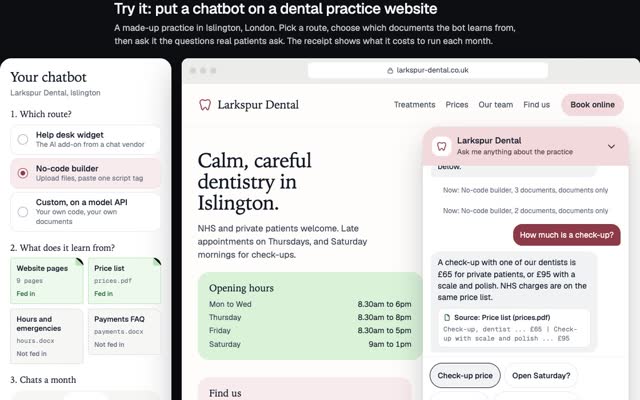
Try it on a small shop’s inbox. Turn on refunds or address changes, or shrink the help centre, and watch each conversation and the monthly bill.
Try itGive the AI agent more power or fewer help articles, and watch the inbox.
This demo needs JavaScript. In short: with read-only permissions and a good help centre, the agent answers most simple questions and hands refunds and address changes to a person. Give it refund or address powers and it resolves more, but the guardrail has to stop the bad requests: a refund over the limit, a change to someone else's order, or an answer no help article backs.
Inbox
What a month costs
How should the handover to a human work?
- One step to a person, any time. Gartner warns that customers forced through failed AI attempts are less likely to use the tool again.
- The agent writes the summary: the question, the order, what it checked and anything a guardrail stopped. The customer never repeats themselves.
- Say what happens next without a promise. “The team will pick this up” is safe. “You’ll hear back in an hour” is not.
- Say it is an AI. Under Article 50 of the EU AI Act, which applies from 2 August 2026, a system that talks to people must tell them they are dealing with an AI unless that is obvious.
How do you measure resolution?
Vendors count resolutions differently, so read the definition before comparing rates. Intercom bills an “outcome” when the customer confirms the issue is resolved, does not ask for more help after the agent replies, or the agent completes a workflow, handoffs included, once per conversation. Zendesk bills an “automated resolution” only when the AI agent resolved the request without escalation to a human. Intercom says its agent averages 76% across 12,000+ customers. Yours depends on your articles and permissions.
What I track every week:
- Resolution, by my own definition: no person touched it, and the customer did not come back about the same thing within 7 days.
- Handover reasons: each is a missing article or permission.
- 20 resolved conversations, read in full. A customer who gave up looks resolved on a dashboard.
- Guardrail stops. Each one is either a bad request or a rule that needs fixing.
How much does an AI customer service agent cost?
Seats for your people, plus a fee per AI resolution. Prices listed in October 2026:
- Intercom: $29, $85 or $132 per seat a month, paid yearly, plus from $0.99 per outcome.
- Zendesk: $19, $55 or $115 per agent a month, paid yearly, with 5 or 10 automated resolutions per agent a month included, then $1.50 each committed or $2.00 pay as you go.
Against people: Gartner’s 2019 poll put a live contact (phone, chat or email) at $8.01 on average, against about $0.10 for self-service. For a small business it is staff time: the median US customer service wage was $21.53 an hour in May 2025, so a 10-minute chat costs about $3.59 in wages alone.
So 1,000 chats a month with half resolved is 500 outcomes at $0.99: $495, plus a seat for the person who takes the rest.
An AI receptionist for a small business is priced per call. Smith.ai’s AI receptionist is free for 25 calls a month, then $3.00 a call, or $150 a month for 75 calls and $500 a month for 300, with transfer to a live receptionist. The median US receptionist earned $18.27 an hour in May 2025. The same rules apply: answers from your own notes, and anything involving money goes to a person.
Which AI customer support software should you choose?
Pick the one that sits on the help desk your team already works in, because the agent needs your articles, your customer records and a handover to a person in the same inbox. Intercom and Zendesk both sell an AI agent on top of their help desk, and both charge per seat plus a fee per resolution, so which is cheaper depends on your seat count and your volume. Compare how each counts a resolution before you compare prices, as above, since that definition sets the bill. Then test three things in a trial: can you lock it to read-only, does it link the article behind each answer, and where does it keep transcripts.
A 2-week rollout plan
Week 1
- Day 1. Export recent conversations; list the questions and the actions asked for.
- Days 2 and 3. Write the articles and rules.
- Day 4. Set the agent up read-only on website chat, connected to the help centre, with signed-in customers verified by your own server before it reads any account.
- Day 5. Replay 50 real past questions, plus refund demands, requests for another customer’s details and questions with no article. Fix what fails.
Week 2
- Day 6. Go live during office hours, with a person watching every conversation.
- Days 7 and 8. Read everything. Write articles for repeated handover reasons.
- Day 9. Extend to evenings and weekends.
- Day 10. Review the four numbers. Decide whether one action, with a limit, has earned its place.
What goes wrong?
Made-up answers. In February 2024 a Canadian tribunal ordered Air Canada to pay a customer C$812.02 after its website chatbot said the customer could claim a bereavement fare after travelling, which the airline’s own policy page ruled out. The tribunal found the airline had not taken reasonable care to make its chatbot accurate, and rejected the argument that it could not be held liable for what the chatbot said (Moffatt v. Air Canada, 2024 BCCRT 149). Answer only from articles, link the source, and hand over when nothing matches.
Refunds and promises. Customers will say a colleague already agreed a refund. Cap the amount per conversation, check the order is the customer’s own, and never let the agent promise money it has not moved.
Privacy. An agent that reads accounts must know who it is talking to. My rule for the fintech desk: no account data until the chat carries an identity your server has signed, so nobody can type someone else’s email address and ask about their money. Keep card numbers out of chat, and check where the vendor stores transcripts.
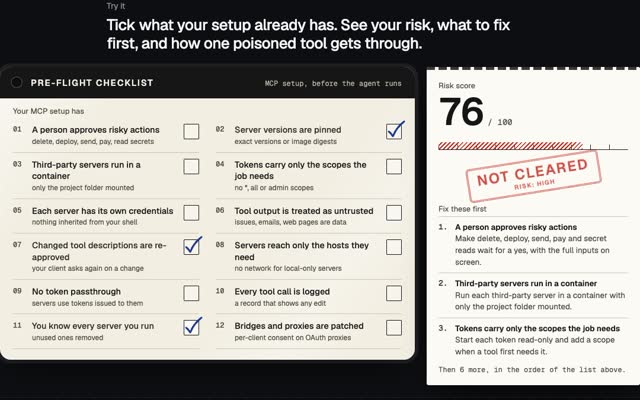
If you are connecting agents to tools over MCP, the MCP security checklist covers that side, and how to stop an AI agent deleting your database covers coding agents. More of my field work is in forward deployed engineer: four AI and fintech builds.
Questions people ask
How much does an AI chatbot for a website cost?
From about $1 to $2 per resolved conversation on the big help desks, plus $19 to $132 per seat a month for the people who handle the rest. Intercom charges from $0.99 per outcome; Zendesk charges $1.50 or $2.00 per automated resolution.
How do I build an AI customer service agent?
Buy the agent and build the parts that matter: the help centre, identity checks, the handover and the guardrail. Launch read-only and add actions one at a time.
Is an AI customer service agent worth it for a small business?
Run the cost numbers above with your own volume. If half your chats are the same ten questions, ten good articles and an agent take them off your team.
Will an AI agent replace my support team?
It takes the repeat questions. People still handle money, exceptions and upset customers, and 87% of customers in Gartner’s 2026 survey want the option to reach one.
If you need an AI help desk set up with these guardrails, write to me at m@tawfik.tv.