How to migrate from Firebase to Supabase without logging out a single user

Export your Firebase users with their password hashes and create them through Supabase’s admin API, which has checked Firebase’s scrypt hashes natively since Supabase Auth v2.162.0 (September 2024). Every user keeps their password and nobody gets a reset email.
Then reshape Firestore documents into tables, copy Storage, switch on row level security before anyone can reach the API, and cut over with either a short write freeze or a dual-write window.
People are making this move toward a database they like. In the Stack Overflow 2025 Developer Survey (July 2025), 47.2% of developers who used Supabase wanted to keep using it, against 40.1% for Cloud Firestore. PostgreSQL, which Supabase is built on, topped the list at 65.5%.
I have moved apps onto Supabase and fixed database security on live ones. This is the order I use, with the commands, checked against Supabase’s migration guides and its firebase-to-supabase tools.
What should you inventory before you migrate?
Write down everything the app touches in Firebase before you write any SQL. The list decides your plan.
- Users by sign-in method: email and password, Google, Apple, phone.
- Custom claims such as
adminorrole. - Collections and subcollections. The Supabase script lists only top-level collections, so walk the subcollections yourself.
- Storage buckets and the folder pattern, usually
users/{uid}/.... - Security rules, because every rule becomes a Postgres policy.
- Cloud Functions, triggers and
onSnapshotlisteners. Push messaging can stay on Firebase Cloud Messaging.
git clone https://github.com/supabase-community/firebase-to-supabase.git
cd firebase-to-supabase/firestore
# add firebase-service.json (Firebase console > Project settings > Service accounts)
node collections.js
Set your app’s shape below to get the plan in order, with what goes wrong at each step.
Try itDescribe your Firebase app. Get the migration plan in order, with what can go wrong at each step.
Your app today
Settings for the move. The plan on the right updates as you change them.
Your cutover
Inventory, schema, users, data, storage, RLS, rehearse, cut over
The plan follows the article above: design tables as a migration with RLS in it, import users with their password hashes, load and reshape the data, copy Storage, rehearse, then freeze and cut, or dual-write if you cannot stop. Keep Firebase read-only for rollback.
Order of operations
Step by step
Risk levels are my rules of thumb from the steps in this article, not a quote. Sample people and data are made up.
How do you turn Firestore documents into Postgres tables?
Design the tables first, as a migration, then load data into them. Firestore rewards copying data into every document that shows it. Postgres rewards storing each fact once and joining.
- One table per collection. Keep the document ID in a
firestore_id text uniquecolumn so every row traces back. - Subcollections become child tables with a foreign key to the parent.
- Arrays of objects become child tables. Arrays of plain values can stay as
text[]. - Maps you filter on become columns. Maps you only display can stay
jsonb. - Denormalised copies, such as the author’s name on every post, get dropped and replaced by a join.
- Firebase user IDs are free-form strings and Supabase user IDs are UUIDs, so keep
firebase_uidon the profile and remap every reference through it.
supabase link --project-ref your-project-ref
supabase migration new firebase_schema

-- supabase/migrations/<timestamp>_firebase_schema.sql
create table public.profiles (
  id uuid primary key references auth.users on delete cascade,
  firebase_uid text unique not null,
  display_name text
);
create table public.orders (
  id bigint generated always as identity primary key,
  firestore_id text unique not null,
  user_id uuid not null references public.profiles (id),
  status text not null,
  total_pence integer not null,
  created_at timestamptz not null
);
create table public.order_items (  -- was the items array inside each order
  order_id bigint not null references public.orders (id) on delete cascade,
  sku text not null,
  qty integer not null check (qty > 0)
);
create index on public.orders (user_id);

-- RLS goes in the same migration as the tables, never later
alter table public.profiles enable row level security;
alter table public.orders enable row level security;
alter table public.order_items enable row level security;
revoke all on public.profiles, public.orders, public.order_items from anon, authenticated;
grant select on public.profiles, public.orders, public.order_items to authenticated;
create policy "own profile" on public.profiles for select to authenticated
  using ((select auth.uid()) = id);
create policy "own orders" on public.orders for select to authenticated
  using ((select auth.uid()) = user_id);
create policy "own items" on public.order_items for select to authenticated
  using (exists (select 1 from public.orders o
                 where o.id = order_id and o.user_id = (select auth.uid())));

supabase db push --dry-run
supabase db push
How do you migrate Firebase Auth users without resetting passwords?
- In the Firebase console, open Authentication, then Users, then the three-dot menu, then Password hash parameters. Copy
base64_signer_key,base64_salt_separator,roundsandmem_cost. Treat them like a password. - Export the users with the Firebase CLI. Its
auth:exportwrites each user’spasswordHashandsaltin standard base64, pluscustomAttributes, which holds custom claims. Users Firebase imported from elsewhere with another hash come out with an empty hash and will need a reset. - Create each user through the admin API with a
password_hashin Supabase’s Firebase format. The supabase-js types saypassword_hashsupports bcrypt, Firebase scrypt and argon2.
firebase auth:export users.json --format=json --project your-firebase-project
npm i @supabase/supabase-js

// import-users.mjs   run: node import-users.mjs users.json
import { readFileSync } from 'node:fs';
import { createClient } from '@supabase/supabase-js';

const e = process.env; // SUPABASE_URL, SUPABASE_SECRET_KEY, FB_SIGNER_KEY, FB_SALT_SEPARATOR, FB_ROUNDS, FB_MEM_COST
const sb = createClient(e.SUPABASE_URL, e.SUPABASE_SECRET_KEY, { auth: { persistSession: false } });
const { users } = JSON.parse(readFileSync(process.argv[2], 'utf8'));

for (const u of users) {
  const hash = u.passwordHash &&
    `$fbscrypt$v=1,n=${e.FB_MEM_COST},r=${e.FB_ROUNDS},p=1,ss=${e.FB_SALT_SEPARATOR},sk=${e.FB_SIGNER_KEY}$${u.salt}$${u.passwordHash}`;
  const { error } = await sb.auth.admin.createUser({
    email: u.email,
    phone: u.phoneNumber,
    email_confirm: !!u.emailVerified,
    phone_confirm: !!u.phoneNumber,
    ...(hash && { password_hash: hash }),
    app_metadata: { firebase_uid: u.localId, ...JSON.parse(u.customAttributes || '{}') },
    user_metadata: { name: u.displayName, avatar_url: u.photoUrl },
  });
  if (error) console.error(u.localId, error.message);
}
Four things catch people here.
- Custom claims go in
app_metadata. Users cannot edit it, so policies can trust it throughauth.jwt() -> 'app_metadata'. Supabase’s RLS guide warns thatuser_metadatacan be changed by the signed-in user. - Google and Apple users need no password. Supabase links identities automatically when the email matches, so their next Google or Apple sign-in lands on the imported account. Set up those providers in Supabase first.
- The older community import script is not the one to use.
import_users.jswrites an empty password and copies the whole Firebase record, hash and salt included, intoraw_user_meta_data. Users would need a password reset or a separate checking server. - Then fill the profiles table from
auth.users, so every Firebase ID has a Supabase ID to map to.
insert into public.profiles (id, firebase_uid, display_name)
select id, raw_app_meta_data ->> 'firebase_uid', raw_user_meta_data ->> 'name'
from auth.users;
How do you move the Firestore data itself?
Export each collection to JSON, load it raw into a holding table, then reshape it with SQL. Two warnings from reading the export script. It pages with offset, and Firestore charges a read for every skipped document, so the bill grows with the square of a large collection. And it writes timestamps as {"_seconds": ..., "_nanoseconds": ...} objects. For anything big, export with a cursor and convert as you go.
// export.mjs   run: node export.mjs orders   (writes orders_raw.json)
import { readFileSync, createWriteStream } from 'node:fs';
import { initializeApp, cert } from 'firebase-admin/app';
import { getFirestore, FieldPath, Timestamp, DocumentReference } from 'firebase-admin/firestore';

initializeApp({ credential: cert(JSON.parse(readFileSync('firebase-service.json', 'utf8'))) });
const plain = v => v instanceof Timestamp ? v.toDate().toISOString()
  : v instanceof DocumentReference ? v.path
  : Array.isArray(v) ? v.map(plain)
  : v && v.constructor === Object ? Object.fromEntries(Object.entries(v).map(([k, x]) => [k, plain(x)]))
  : v;
const name = process.argv[2], out = createWriteStream(`${name}_raw.json`);
let last, n = 0;
out.write('[');
for (;;) {
  let q = getFirestore().collection(name).orderBy(FieldPath.documentId()).limit(1000);
  if (last) q = q.startAfter(last);
  const snap = await q.get();
  if (snap.empty) break;
  for (const d of snap.docs) out.write((n++ ? ',\n' : '\n') + JSON.stringify({ firestore_id: d.id, ...plain(d.data()) }));
  last = snap.docs.at(-1);
}
out.end('\n]\n');
console.log(n, 'documents');
Load it with the Supabase tool, which creates a table named after the file in public with RLS off. Move it out of the API’s reach straight away, reshape, then compare counts.
node json2supabase.js ./orders_raw.json

create schema if not exists staging;
alter table public.orders_raw set schema staging;

insert into public.orders (firestore_id, user_id, status, total_pence, created_at)
select r.firestore_id, p.id, r.status, round(r.total * 100), r.created_at::timestamptz
from staging.orders_raw r
join public.profiles p on p.firebase_uid = r.uid;

insert into public.order_items (order_id, sku, qty)
select o.id, i ->> 'sku', (i ->> 'qty')::int
from staging.orders_raw r
join public.orders o using (firestore_id)
cross join jsonb_array_elements(r.items) i;

select (select count(*) from staging.orders_raw) as firestore,
       (select count(*) from public.orders) as postgres;
If the two counts differ, the join dropped rows, usually orders whose user no longer exists. Find them before cutover, not after. The functions used are in the Postgres JSON docs.
How do you move Firebase Storage?
node download.js "" downloads pulls the bucket to disk and node upload.js "" downloads avatars pushes it to a Supabase bucket, which the tool creates as private. Two follow-ups: rewrite any firebasestorage.googleapis.com links saved inside your documents, and write storage policies. If your paths look like users/{uid}/... with the Firebase user ID, match the folder against the ID you imported.
create policy "read own files" on storage.objects for select to authenticated
using (bucket_id = 'avatars'
  and (storage.foldername(name))[2] = (select auth.jwt() -> 'app_metadata' ->> 'firebase_uid'));
Why must row level security be on before go-live?
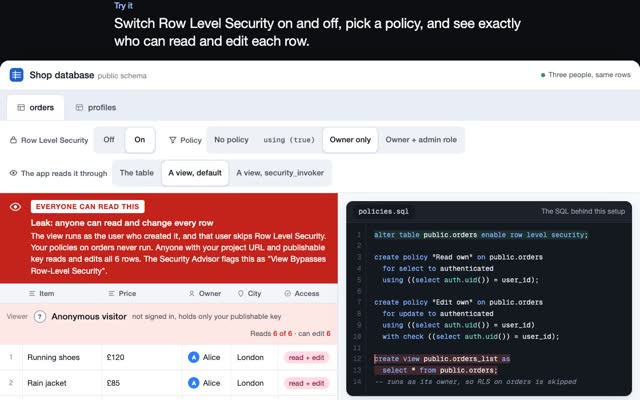
Firebase blocks a client that has no matching rule. Supabase works the other way round. Its RLS guide says a table in an exposed schema without RLS is readable and writable by any role with a grant on it, and the publishable key shipped in your app makes requests as the anon role, which on many projects still holds those grants. In March 2025 a researcher scanned 1,645 apps featured by the Lovable app builder and found 170 of them exposing data through insufficient RLS (his write-up, filed as CVE-2025-48757). Write a policy test with supabase test db, and run the Supabase security checklist before the switch.
If you used onSnapshot, add each table to the supabase_realtime publication. Supabase’s Realtime docs say RLS is not applied to delete events, and suggest Broadcast past about 3,000 subscribers on the same changes.
Freeze-and-cut or dual-write?
Freeze-and-cut suits most apps that can take an hour of maintenance. Announce it, make Firestore read-only with rules (allow write: if false;), pause Cloud Functions too because the Admin SDK ignores rules, export the final state, import, check counts, ship the app config that points at Supabase, reopen.
Dual-write is for apps that cannot stop, and for mobile apps where old versions keep talking to Firebase for weeks. New code writes to both, a backfill copies history, a nightly job compares counts, reads switch once the numbers match, and Firebase writes stop last. It costs more code and every write path has to be found.
Rollback. Keep the Firebase project untouched and read-only for at least a month. Keep the previous app build ready to point back. Anyone who signs up or changes their password after cutover exists only in Supabase, so export them before you roll back.
How do you fix a broken Supabase migration history?
It breaks when someone changes the schema in the dashboard, renames a migration file, or a push fails halfway. supabase db push then stops with “Remote migration versions not found in local migrations directory.” The CLI reference fix: compare, mark, pull.
supabase migration list                       # LOCAL vs REMOTE, by timestamp

# remote has a version you don't have locally: drop it from the history
supabase migration repair 20260101120000 --status reverted
supabase db pull                              # capture the real schema as a new file

# you ran a local file by hand: record it as applied without running it again
supabase migration repair 20260102090000 --status applied

supabase db push --dry-run
repair only edits the history table, supabase_migrations.schema_migrations. It never changes your schema, which is why it is safe and why it is not a fix on its own.
Questions people ask
Can I migrate Firebase Auth to Supabase without password resets?
Yes. Export users with firebase auth:export, then create them with auth.admin.createUser and a password_hash in the $fbscrypt$ format built from your project’s hash parameters.
How long does a Firebase to Supabase migration take?
It depends on the number of collections and write paths more than on the number of users. A full rehearsal on a staging project tells you the real cutover time.
Do I keep my Firebase user IDs?
Not as the primary key, because Supabase user IDs are UUIDs. Keep the old ID in app_metadata and on the profiles table, and remap references through it.
What is supabase migration repair for?
Fixing the migration history table when it no longer matches your migration files. It marks versions applied or reverted without running any SQL.
Do I need a database migration consultant or database migration services?
For a small app, this page is enough. For live payments, many write paths, or a mobile app that cannot stop, an outside review of the cutover and the policies is cheap insurance. More on how I work as a forward deployed engineer, and on keeping AI agents away from your production database.
If you need a migration like this planned or done, write to me at m@tawfik.tv.