How to prove you’re over 18 without showing your ID

You prove your age once to someone you trust, like a bank, a government or a wallet on your phone, and from then on each website gets one signed answer: over 18, yes. With a zero-knowledge proof, the website can check that answer is real without learning your name, your birth date or which card it came from.
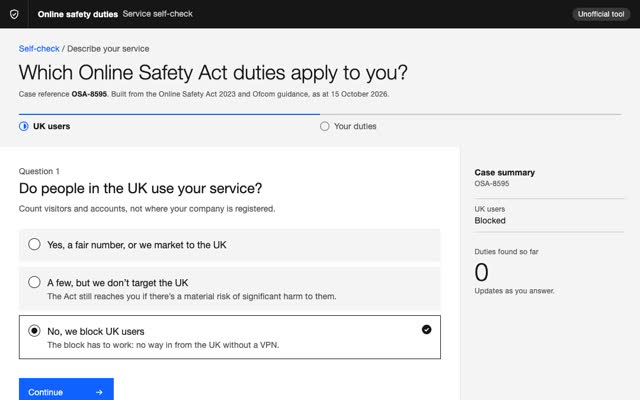
The UK is now running this at scale. Ofcom’s report to Parliament, published 16 July 2026, counted over 69 million age checks between July and December 2025 across the 32 services it analysed, a 23-fold jump on the six months before. Facial age estimation was the method most offered, then photo ID matching.
Most of those checks still move far more than one fact. I’ve built identity products three times around one rule: prove the fact, not the person. The long version, with the three builds, is in How to prove who someone is without seeing who they are. This is the short one for age.
How does age verification work in the UK?
The Online Safety Act makes two groups of services check age.
- Sites that publish porn themselves. Their duty to use age checks came into force on 17 January 2025.
- Sites and apps where users share content that children are likely to use. Since July 2025, if they allow porn or content about suicide, self-harm or eating disorders, they must keep children away from it. Ofcom says most of the services it studied switched age checks on around 25 July 2025.
The check has to be “highly effective”. Ofcom judges that on four things: technical accuracy, robustness, reliability and fairness. Ticking a box that says “I’m 18” does not count. Services that get it wrong can be fined up to £18 million or 10% of their qualifying worldwide revenue, whichever is greater.
What age verification methods does Ofcom accept?
Ofcom lists seven methods it considers capable of being highly effective. The list is not closed, and each one still has to be done well. Here they are, with what leaves your phone.
- Open banking. You log in to your bank and agree to share details with an age checking company, which tells the site yes or no.
- Photo ID matching. You upload a passport or driving licence and a selfie. The whole ID page goes.
- Facial age estimation. Software guesses your age from a selfie. Your face goes, unless the guess runs on your phone.
- Mobile network checks. Your mobile network says whether your account belongs to an adult. The site gets a yes or no.
- Credit card checks. Only adults can get a UK credit card, so a valid one is the signal.
- Email-based age estimation. Software looks at where your email address has been used before, such as with banks, and estimates your age from that.
- Digital identity services. A wallet or app that already checked you sends the answer. This is where selective disclosure and zero-knowledge proofs live.
Privacy is part of the job too. Ofcom’s report says services must follow UK data protection law, and found many delete the data straight away. Others keep it for a while: one third-party face check kept face images and ID documents for up to an hour. Two social media services ran the face check on the phone, so only a pass or fail left it.
What does each method give away?
The answer changes with the question: a face can say “probably over 18”, never where you live. You are the website.
Try it
You are the website. Ask one question, pick how the visitor proves it.
The visitor is Sam, a made-up adult in London. Watch what leaves Sam’s phone and what stays on it.
This demo needs JavaScript. In short: a passport upload sends your whole ID page, a face check sends your face, a bank check brings your bank and a checking company into it, a credential wallet sends one signed line, and a zero-knowledge proof sends a proof that the line is true and nothing else.
Wallet
Nothing. Every detail stayed in Sam’s pocket.
None of these hide Sam’s internet address or device. Hiding those is a job for the network, outside any proof. A simple model of each method, written for this page.
The pattern matches my longer piece. A photo of your ID sends everything printed on it, and anything stored can leak: Discord said about 70,000 users may have had government ID photos exposed through a customer service vendor that used them to review age appeals. A signed credential sends one line. A zero-knowledge proof sends a proof that the line is true, and nothing else.
How does a zero-knowledge proof prove your age?
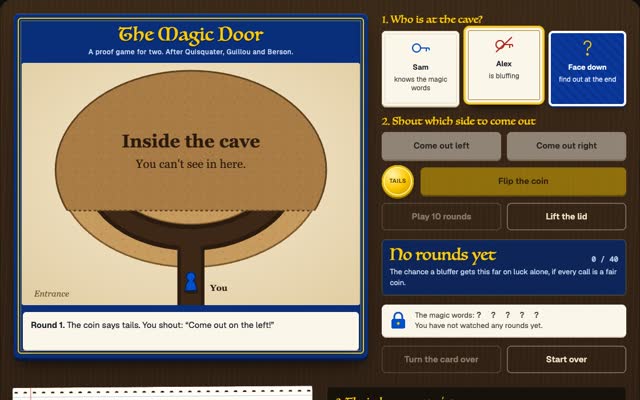
Picture a busy page with one character hidden on it. You lay a big sheet of card over the page with one small hole, right on the character. Your friend sees you found it and learns nothing about where it is on the page. That’s a zero-knowledge proof. Software does it with maths instead of card.
For age, it runs in four steps.
- Checked once. A trusted issuer, like a government, a bank or a phone wallet provider, checks your ID one time and gives your phone a signed card.
- The site asks one question. Over 18?
- Your phone makes a proof. It says: “I hold a card signed by a real issuer, and it says I’m over 18.” The card itself never leaves the phone.
- The site checks the maths. It gets yes or no. It never sees your name, birth date or card, and each proof looks new, so two sites can’t match you by it.
Google open-sourced its zero-knowledge libraries for age checks in July 2025, with the example of proving you’re over 18 “without sharing anything else at all”.
What a proof does not hide: your internet address, your device, and a site that asks for more than it needs. The EFF makes that point well.
What is selective disclosure, and how is it different?
Selective disclosure is the step before zero-knowledge. The issuer seals each line of your credential in its own envelope, mixes in a random value so nobody can guess what’s inside, and signs the list of sealed envelopes. You open only the line you need, say “over 18”, and the site checks it matches the signed list.
- SD-JWT, the internet standard RFC 9901, published November 2025, works this way.
- Mobile driving licences under ISO/IEC 18013-5 use the same salted-hash trick, so a holder can show proof of age without the rest of the licence.
- W3C Verifiable Credentials 2.0, a W3C Recommendation since May 2025, names the roles: issuer, holder, verifier.
The catch: show the same signed card to two sites and they can link you, because the signature is identical. RFC 9901 says so in section 10.1 and gives the fix: the issuer hands out a batch of fresh copies, one per site. Flip that switch in the demo above to see it.
What is the EU doing about age verification?
The EU went straight for this design. Its age verification blueprint came out in July 2025 as open-source tools. The second version, in October 2025, added passports and ID cards as a way to get a proof of age, and included zero-knowledge proofs. Denmark, France, Greece, Italy and Spain are building national apps on it, and the Commission says the proof of age carries no ID details that trace back to you.
It’s built to work with the EU Digital Identity Wallets that member states must offer their citizens by the end of 2026.
How much does age verification cost?
For most services, a few pence a check. Ofcom’s July 2026 report worked out what the services it studied paid on average per check: a median of around £0.06, most at or below £0.10, and none above £0.30, the top of the £0.05 to £0.30 range Ofcom had estimated in April 2025.
The other costs, from the same report:
- Set-up. Where services reported it, mostly tens of thousands of pounds, for IT integration, engineering, testing and user support. A few reported none, because they already had a vendor or had rolled checks out in other countries.
- Digital ID. Twelve of the services offered digital ID checks, and generally reported them as free to the service. Two reported minimal costs.
- Lost visitors. Traffic to porn services fell sharply once checks went live, and Ofcom counts the lost revenue as a cost.
- Checking the same person twice. A service that can’t recognise returning users may need to check them again, which makes the price per check matter more.
Ofcom adds that the average price per check often falls as volume grows, because vendors sell on fixed fees, subscriptions and volume tiers.
What do age and KYC verification providers charge?
A few publish their prices. These are list prices from their own pages, checked on 15 October 2026, before volume discounts.
- Didit: age estimation from a selfie, with a liveness check, is $0.10 a check. A full ID check (document, liveness, face match) is $0.33, and the first 500 every month are free. No monthly minimum.
- Veriff: Essential is $0.80 a verification with a $49 monthly minimum. Plus is $1.39 with a $99 minimum, and Premium $1.89 with a $209 minimum; both add specialist review.
- Sumsub: Basic is $1.35 a verification with a $149 monthly minimum. Compliance, which adds AML screening, is $1.85 with a $299 minimum.
- Stripe Identity: $1.50 for an ID document and selfie check, charged when the user completes it.
- Ondato: identity verification from €1.40 down to €0.50 a check, depending on volume.
Yoti does not publish prices on its age verification page; you ask its sales team.
Most of these are full identity checks, built for KYC: they confirm who someone is. An age gate needs one fact, so running full KYC on every visitor buys more data than you need, at a higher price. Watch the minimums too: at 30 checks a month, a $149 minimum works out at about $4.97 a check.
This estimator needs JavaScript. In short, at 10,000 checks a month on public list prices: face age estimates cost $1,000 at Didit. ID and selfie checks cost $3,135 at Didit after 500 free, $8,000 at Veriff Essential, $13,500 at Sumsub Basic and $15,000 at Stripe Identity. Ofcom found the services it studied paid a median of around £0.06 a check.
Billing Usage
Usage and estimated bill
One month, LondonList prices, 15 Oct 2026
Usage
Adjust to match your siteOfcom: services that can’t recognise returning users may need to check the same person again, which makes per-check prices matter more.
Upcoming invoice
Estimate, not a quote| Provider | Relative cost | A check | A month |
|---|
List prices in each provider’s published currency, before volume discounts, checked on 15 October 2026. Didit’s age estimate includes a liveness check. Sumsub and Stripe say they charge for completed checks. The Ofcom figure is in pounds and comes from its July 2026 report. A simple model, written for this page.
Which KYC or age verification software is best?
The one that answers your question with the least data, at your volume. Five things I check before picking one.
- Do you need to know who, or only how old? If the question is over 18, a face estimate or a digital ID answer is enough. The worked example in Ofcom and the ICO’s joint statement of 25 March 2026 collects only the information strictly necessary to confirm a user’s age or age range. Full KYC is for when you must know the person, such as when money moves.
- What does it cost at your volume? Price per check, plus the monthly minimum, minus any free allowance. Run your own numbers in the bill above.
- Can people come back without another check? Keep the yes on their account, as in prove the fact, not the person, or accept a reusable digital ID.
- What does the vendor keep, and for how long? The same statement’s example tells users what is collected and how long it is stored. Get both in writing before you sign.
- Can a wrongly blocked adult appeal? The example also gives users a prominent way to challenge a wrong age decision.
If you keep that yes in your own database, lock the table down. My Supabase security checklist is how I check access rules on tables like that.
What I’d build if your site needs age checks
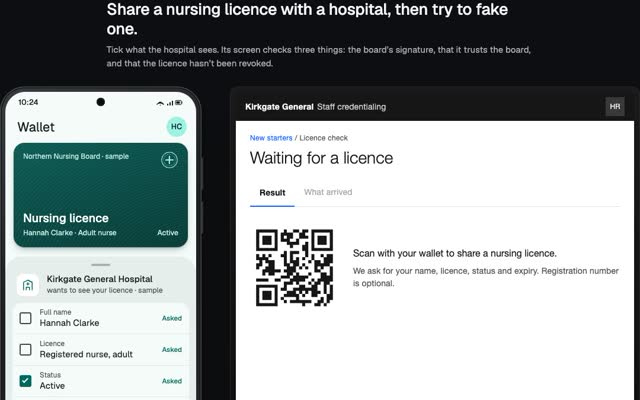
I led a credential product where nurses and doctors prove their licence to employers. The licence is checked once at the source and sealed to the professional’s own key, and they tick which fields each employer gets. Unticked fields are removed before anything leaves the phone. The gap I’d close next time: the issuer signed the whole licence, so a partial share couldn’t be checked line by line. SD-JWT fixes that, so I’d start there.
At PLAYERUNKNOWN Productions I designed a zero-knowledge ID for players: the game learns a player is real, and a tag catches a second account, without learning who they are.
For age checks, the same rules carry over.
- Ask for one fact. Over 18, not a birth date.
- Don’t hold what you don’t need. Keep the yes, delete the rest.
- Never call the issuer at check time. Check the signature against a published key, so the issuer never learns where you went.
- Give fresh copies, or use proofs, so sites can’t link people.
- Say what still shows. Internet address, device, account.
Questions people ask
Is zero-knowledge age verification allowed under the Online Safety Act?
Ofcom’s guidance is technology-neutral and lists digital identity services among the methods capable of being highly effective. A zero-knowledge proof is one way a digital identity service can deliver the answer. It still has to meet Ofcom’s four criteria: accuracy, robustness, reliability and fairness.
Do age checks keep my ID or my face?
Some do, for a while, as Ofcom found above. Before you upload, ask who keeps the photo, for how long, and which vendors see it.
What’s the difference between age verification and age estimation?
Verification checks a record: your ID, your bank, your mobile account. Estimation makes a guess, from your face or your email history. A guess is surest far from the age line. Every porn service Ofcom studied offered more than one method, three on average.
Can a website track me if I use a zero-knowledge proof?
Not through the proof, since each one looks new. It can still see your internet address, your device and your account.
Can I prove my age once and reuse it?
Yes, with a digital identity wallet, and Ofcom’s report notes reuse may cut costs. To keep it private, the wallet needs fresh copies per site or zero-knowledge proofs.
How much does an age check cost per user?
Ofcom found the services it studied paid a median of around £0.06 a check, most at or below £0.10. Public list prices run from $0.10 for a selfie age estimate to $1.50 for an ID and selfie check, and monthly minimums raise the cost per check at low volume.
Do you build an age verification service?
Yes. I design and build identity and credential products end to end, as a fractional CPO or hands on. If you need privacy-preserving age checks built, write to m@tawfik.tv.